
AD Recon Lite — Lightweight Active Directory enumeration and dangerous-config detector
A focused Python tool that connects to a domain controller over LDAP and flags the AD misconfigurations attackers actually target during enumeration
AD Recon Lite
A small, fully readable AD audit tool built for home lab work and as a study aid for why these misconfigurations matter.
The Goal
The big AD recon tools — BloodHound, PingCastle, the original ADRecon — are excellent, but they're enormous. I wanted something I could fully reason about line by line, run against my home lab without a heavyweight setup, and use as a reference when studying for offensive security certs and CTF prep.
The other requirement was an offline mode. I wanted to be able to demo the detection logic and run the full test suite without having a live domain controller attached. That constraint turned out to be a useful design forcing function — it kept the code cleanly separated between the LDAP transport layer and the analysis layer.
How It Works
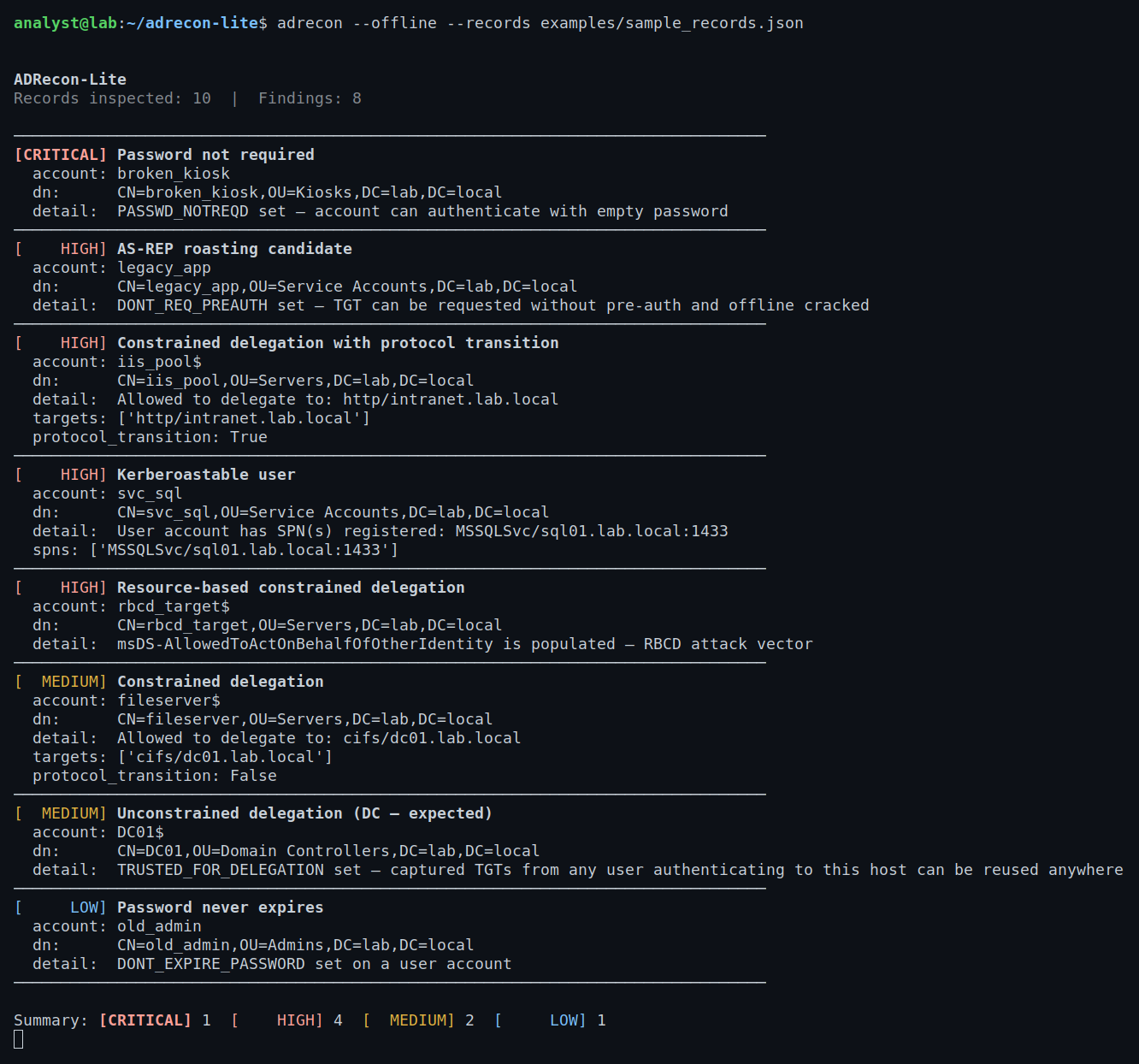
The tool connects to a domain controller over LDAP (or LDAPS), pulls user and computer records, and runs each record through a set of detection functions. Every function operates on a normalized list of Python dicts — the same format whether the records came from a live DC or a local JSON fixture.
The userAccountControl bitmask is where most of the interesting flags live. Windows encodes account state as a single integer, and AD misconfigurations are almost always just specific bits set or not set. I wrote a dedicated uac.py module to decode that bitmask into named flags and expose clean boolean helpers:
def asrep_roastable(uac: int | str | None) -> bool:
    return has_flag(uac, "DONT_REQ_PREAUTH")

def trusted_for_delegation(uac: int | str | None) -> bool:
    return has_flag(uac, "TRUSTED_FOR_DELEGATION")

def password_not_required(uac: int | str | None) -> bool:
    return has_flag(uac, "PASSWD_NOTREQD")
The detection layer (findings.py) calls these helpers, filters out disabled accounts automatically, and returns a sorted list of Finding dataclasses ranked by severity.
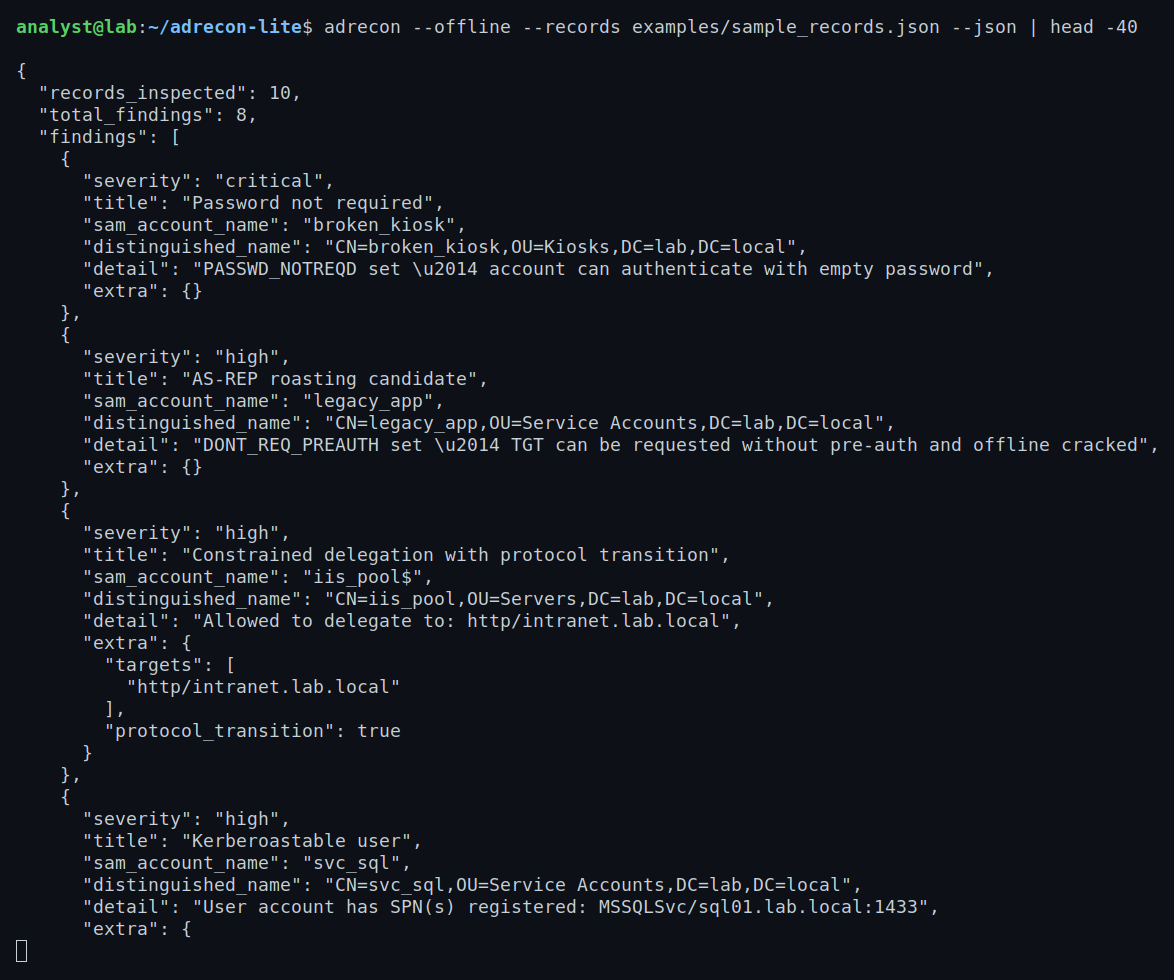
The CLI supports live LDAP, LDAPS, and a --json flag for piping output into a SOAR pipeline or just saving a structured audit log.
What It Enumerates
| Finding | Severity | Why it matters |
|---|---|---|
| AS-REP roasting candidate | high | DONT_REQ_PREAUTH set — TGT can be requested without preauthentication and cracked offline |
| Kerberoastable user | high | User account with a registered SPN — service ticket can be requested and cracked offline |
| Unconstrained delegation | critical (medium on DC) | Any TGT from a user authenticating to this host can be forwarded anywhere |
| Constrained delegation | medium | Account can impersonate users to specific services |
| Constrained delegation with protocol transition | high | Same, but bypasses the requirement for the user to initiate authentication |
| Resource-based constrained delegation (RBCD) | high | msDS-AllowedToActOnBehalfOfOtherIdentity populated — classic RBCD attack path |
| Password not required | critical | PASSWD_NOTREQD set — account accepts empty password authentication |
| Password never expires | low | Common on legacy admin accounts — credential rotation not happening |
Disabled accounts are excluded from all checks. A dangerous flag on a disabled account is not an active attack surface.
Tech & Tools
- Python 3.10+ — dataclasses, type hints throughout
- ldap3 — LDAP / LDAPS transport and record retrieval
- pyproject.toml — installed as a proper package with an
adreconCLI entry point - unittest + unittest.mock — full test suite covering detection logic and UAC flag parsing
- Offline mode — JSON fixture files let the tool run without a live DC, which made CI and demos much easier
The architecture is split cleanly: client.py handles LDAP connection and record fetching, uac.py handles bitmask decoding, findings.py has all the detection logic, and output.py / cli.py handle presentation. Nothing in the detection layer knows or cares whether the records came from a real DC.
What I Learned
On Active Directory internals:
- The
userAccountControlbitmask packs a lot of security-relevant state into one integer. Understanding which bit maps to which behavior made the Kerberos attack paths much more concrete — AS-REP roasting and Kerberoasting aren't abstract concepts when you're looking at the exact flag that enables them. - Unconstrained delegation on a non-DC is genuinely alarming. If an attacker can compromise that host, every TGT that's been handed to it is potentially reusable. The DC carve-out in the detection logic was a deliberate choice — flagging every DC as critical would just create noise.
- RBCD is easy to miss because it lives in a separate attribute (
msDS-AllowedToActOnBehalfOfOtherIdentity) rather than in the UAC bitmask, so tools that only check UAC will silently skip it.
On tool design:
- Separating transport from analysis made the offline mode essentially free. The detection functions don't care where the dicts came from.
- Exit codes matter for automation. Returning
1on any critical or high finding means the tool can gate a pipeline without parsing output. - Building a smaller, fully readable version of an existing tool category is a solid way to actually understand what the bigger tools are doing under the hood.
Use Case
This was built primarily for home lab use — running against a Windows Server 2019 evaluation VM with intentionally misconfigured test accounts, and against GOAD (Game Of Active Directory) for a more realistic multi-domain scenario. The offline mode means I can also demo the full detection pipeline without spinning up a VM, which is useful for walkthroughs and writeups.