Container Watch — Docker Runtime Security Monitor
A lightweight Python tool that audits running containers for dangerous misconfigurations — privileged mode, sensitive mounts, exposed sockets, and more — in real time or on demand
ContainerWatch
A lightweight Docker runtime security monitor that alerts on dangerous container configurations as they happen — no agent, no daemon, no overhead.
The Goal
Container security is mostly configuration security. The exploits that matter in practice aren't usually CVEs in the container runtime — they're misconfigurations: a forgotten --privileged, a docker.sock mounted into a CI runner, a homelab compose file with network: host set for convenience and never removed.
Tools like Falco, Trivy, and Docker Bench catch most of this, but they're heavy. I wanted something I could drop onto any machine with a reachable Docker daemon, read the entire codebase in a sitting, and pipe into whatever detection stack I was already using. ContainerWatch is that tool.
How It Works
The core data structure is a Finding dataclass — severity, rule name, container name, and a plain-English detail string. Every check is a pure function that takes a Docker inspect dict and returns zero or more Finding objects. The inspect dict is exactly what docker inspect returns, which means the same check code works whether you're hitting a live daemon or reading a saved JSON snapshot offline.
Two modes:
audit— queries the Docker daemon once, inspects every running container, prints findings sorted critical → high → medium, then exits with code1if anything critical or high was found. Clean exit code design makes it usable as a pre-deploy gate or CI step.monitor— subscribes to the Docker events socket and audits each container the moment it starts. Designed to run as a long-lived process — asystemdunit on a build server works well.
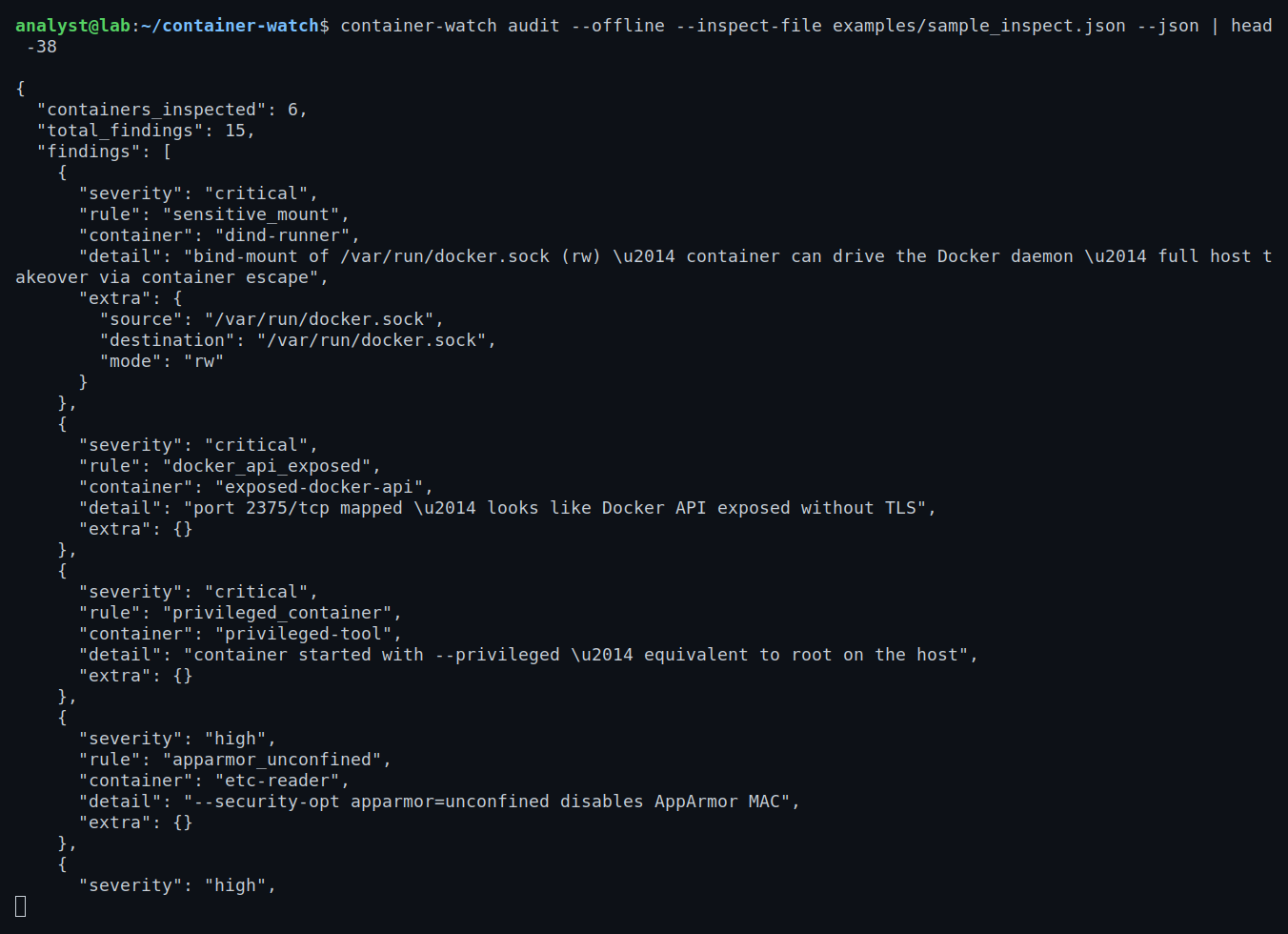
Output is either color-formatted terminal text or JSON, so findings can be forwarded directly to a SIEM or a tool like LogHound.
Capabilities
The check suite covers the configurations that actually matter in real-world container escapes and privilege escalations:
| Finding | Severity | Why it matters |
|---|---|---|
--privileged container |
critical | Equivalent to root on the host — no effective isolation |
Docker socket mounted (/var/run/docker.sock) |
critical | Container can drive the daemon; escape by launching a new privileged container |
Root filesystem or /etc, /proc, /sys bind-mounted (rw) |
high | Read or modify host state directly |
| Same paths mounted read-only | medium | Still leaks secrets and host configuration |
--pid=host |
high | Container sees and can signal every process on the host |
--network=host |
high | Bypasses container network isolation entirely |
Dangerous capabilities (SYS_ADMIN, NET_ADMIN, SYS_PTRACE, SYS_MODULE, etc.) |
high | Should never be added without a specific documented reason |
--security-opt seccomp=unconfined |
high | Disables syscall filtering — all syscalls reachable from inside the container |
--security-opt apparmor=unconfined |
high | Disables AppArmor MAC profile |
Port 2375/tcp exposed |
critical | Docker API without TLS — usually an accident with large blast radius |
| Process running as root | medium | Addressable with --user; not catastrophic alone but stacks badly with other findings |
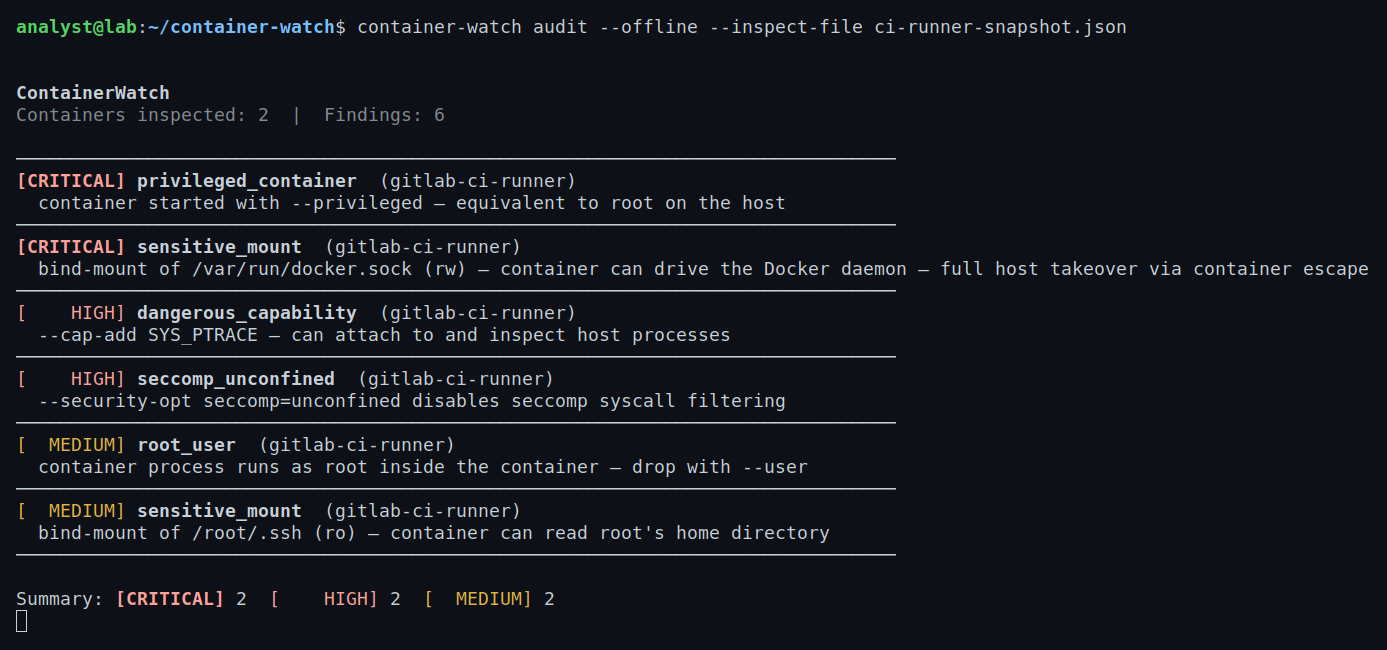
Findings are sorted critical → low and tagged with the container name. The offline mode — audit --offline --inspect-file snapshot.json — is useful for triaging a host you can't connect to directly, or for static analysis in CI before a container ever runs.
Tech & Tools
- Python 3.10+ — dataclasses, type hints throughout, no runtime dependencies beyond the Docker SDK
- docker-py — official Docker SDK; used for both live daemon queries (
containers.list(),containers.get()) and the events stream (client.events()) - argparse — CLI surface: two subcommands (
audit,monitor),--json,--no-color,--offline,--inspect-file - Exit codes —
0clean,1critical/high findings,2config/connectivity error; designed to fail CI pipelines correctly - JSON output — structured findings ready for SIEM ingestion or piping to other tools
The check functions are intentionally pure and isolated. audit() composes them all; audit_many() wraps audit() for a list of containers and returns one sorted result set. Adding a new check means writing one function and adding it to the tuple in audit() — nothing else changes.
What I Learned
On container security:
- The most impactful misconfigurations are almost never accidental CVEs — they're convenience settings that never got reverted.
--privilegedanddocker.sockmounts are the two that matter most; if either is present, everything else is academic. docker.sockis critical even read-only because socket access equals daemon control. A container with read-only access to the socket can still issuedocker run --privilegedand escape.- Capability semantics are subtle.
NET_RAWsounds narrow but lets a container craft arbitrary packets on the host network.SYS_ADMINis essentially root. Normalizing capability names (stripping theCAP_prefix, uppercasing) was necessary because Docker and the Linux kernel don't always agree on format.
On tool design:
- Pure check functions that take and return plain data are much easier to test than anything that reaches out to a daemon. Every check in this codebase can be tested with a dict literal — no Docker required.
- Exit code discipline matters for security tooling. Returning
1on findings and2on errors gives CI pipelines a clean way to distinguish "this container is misconfigured" from "we couldn't check." - Offline mode (reading a saved
docker inspectJSON) turned out to be more useful than I expected — it means you can collect evidence from a host and analyze it somewhere else, which matters for incident triage.
On the detection problem:
- Runtime monitoring catches what static analysis misses: containers started interactively, CI runners spun up mid-pipeline, or images pulled and run without going through any review gate. Both modes matter.
- The gap between "tool found it" and "someone acted on it" is where most security tooling fails. Structured JSON output and well-defined exit codes are the minimum viable interface for getting findings into something that pages a human.