
Cross-Verified Job Scraper (Python)
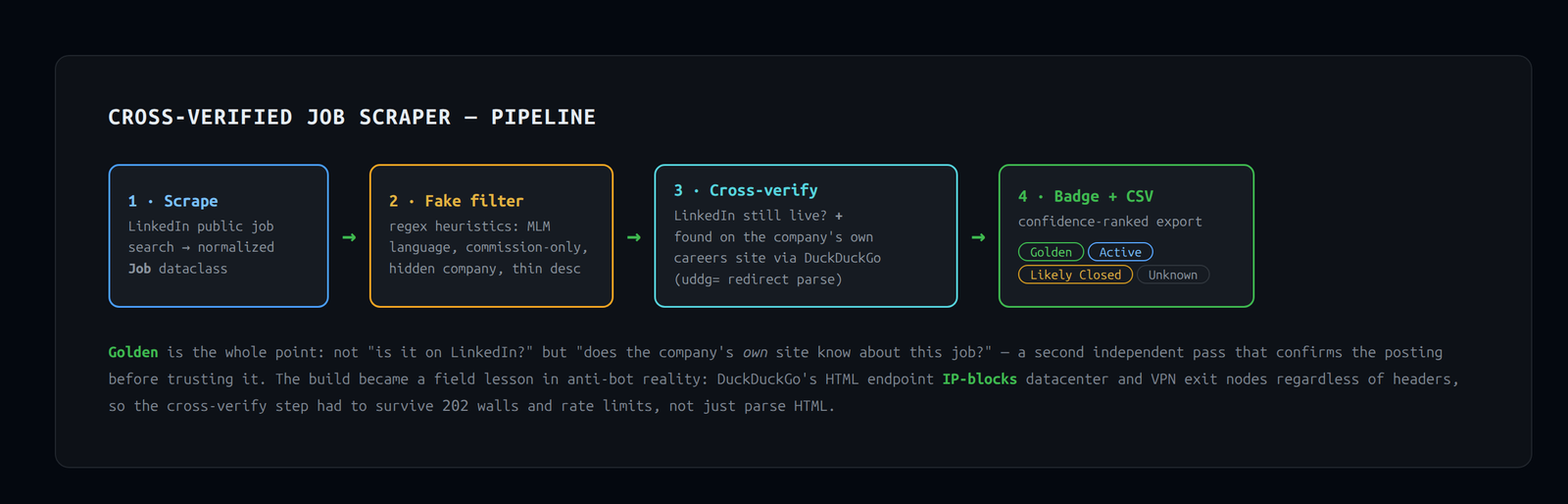
A LinkedIn job scraper with MLM/scam filtering, plus a second-pass cross-verification step that confirms each posting on the company's own careers site before flagging it as Golden.
Building a Cross-Verified Job Scraper in Python
A weekend project that turned into a deep dive on LinkedIn scraping, fake job detection, DuckDuckGo bot blocking, and VPN routing on Linux.
The Goal
I wanted a tool that would:
- Scrape cybersecurity and IT job listings from LinkedIn for my local metro area
- Filter out fake, scam, and MLM postings automatically
- Cross-verify each listing against the company's own careers site — not just "is it on LinkedIn?" but "does the company itself know about this job?"
- Assign each job a confidence badge: Golden, Active, Likely Closed, or Unknown
Phase 1 — The Scraper & Fake Job Filter
The foundation was job_scraper.py, a requests + BeautifulSoup scraper targeting LinkedIn's public job search endpoint.
The Job Dataclass
Every listing is normalized into a clean dataclass:
@dataclass
class Job:
    title: str
    company: str
    location: str
    snippet: str
    url: str
    salary: Optional[str] = None
    posted: Optional[str] = None
    is_fake: bool = False
    fake_reasons: list[str] = field(default_factory=list)
    status: str = "Unknown"
    company_url: Optional[str] = None
Fake Job Detection
A regex-based heuristic engine (detect_fake) scans each listing's title, company name, and snippet for red flags:
- MLM language: "unlimited earning," "passive income," "be your own boss"
- Commission-only traps: "1099 contractor," "commission-only"
- Known bad actors in the multi-level-marketing space
- Structural signals: hidden company name, description under 60 characters
_FAKE_PHRASES = [
    r"unlimited earning",
    r"passive income",
    r"\bmlm\b",
    r"commission.?only",
    r"1099 (contractor|position)",
    # ... and more
]
Phase 2 — Cross-Verification
This is where it got interesting. The idea: a second pass that independently checks whether a job is still open and findable on the company's own site — earning it a Golden badge.
Status System
| Status | Meaning |
|---|---|
| Golden | LinkedIn live + found on company's own careers site |
| Active | LinkedIn page is still live |
| Likely Closed | LinkedIn shows "no longer accepting applications" or 404s |
| Unknown | Request failed or ambiguous |
_check_linkedin_status(url, session)
A simple GET to the job's LinkedIn URL. Looks for:
- HTTP 404 →
"closed" - Phrases like "no longer accepting applications", "job has expired" →
"closed" - Anything else →
"active" - Exception →
"unknown"
Bug caught in testing: Originally used except requests.RequestException which only catches requests-library errors. Generic exceptions (timeouts, SSL errors) slipped through. Fixed to except Exception.
_check_company_listing(company, title, session)
Posts a targeted query to DuckDuckGo's HTML endpoint:
"Senior Cybersecurity Analyst" "ExampleCo" (careers OR jobs)
-site:linkedin.com -site:indeed.com -site:glassdoor.com
Parses the top 5 results and returns the first URL that doesn't belong to a known job aggregator. The real destination URL is extracted from DuckDuckGo's uddg= redirect parameter embedded in each result link:
params = parse_qs(urlparse(href).query)
real_url = params.get("uddg", [""])[0]
Key design decision: ATS platforms like Greenhouse, Lever, Workday, Paylocity, and iCIMS are not treated as aggregators — they host the company's own listing. A Paylocity URL for a real employer IS that employer's careers page.
verify_jobs(jobs, session, delay=2.0)
Orchestrates the two checks with polite delays:
for job in jobs:
    linkedin_status = _check_linkedin_status(job.url, session)
    time.sleep(delay)
    if linkedin_status == "active":
        company_url = _check_company_listing(job.company, job.title, session)
        time.sleep(delay)
        job.status = STATUS_GOLDEN if company_url else STATUS_ACTIVE
        job.company_url = company_url
Phase 3 — CSV Export
save_to_csv() writes a sorted, human-readable CSV:
statusis the first column — the most important signal at a glance- Rows sorted: Golden → Active → Unknown → Likely Closed
fake_reasonslist serialized as" | "-joined string
Testing Philosophy
Every function was smoke-tested with unittest.mock before any live network calls.
The Session Mocking Problem
When _check_company_listing was refactored to create its own fresh session for DDG (to avoid cookie contamination from LinkedIn scraping), the existing tests broke — they mocked the passed-in session, not the internally-created one.
The fix was to patch requests.Session at the module level:
with patch("job_scraper.requests.Session", return_value=mock_ddg):
    result = _check_company_listing("Acme Corp", "SOC Analyst", session)
Final test count: 23/23 passing, covering:
- 404 detection, closed-phrase matching, exception handling
- Non-aggregator URL extraction, aggregator filtering, empty results, 202 bot-block
- Golden/Active/Unknown/Likely Closed status assignment
- CSV column ordering and sort order
The Wall We Hit: DuckDuckGo Bot Detection
This is the most interesting part of the whole project.
What Happened
The first live run worked perfectly — the test target came back Golden with a company URL. Every subsequent run returned 202 from DDG with zero results.
Diagnosing the Problem
I methodically ruled out causes:
| Hypothesis | Finding |
|---|---|
| Wrong HTML selectors | .result__url and uddg= extraction verified working on real responses |
| Query too specific | Even broad "company" careers queries returned 202 |
| Python-specific headers | curl also returned 202 on the same IP |
| VPN would fix it | Tried exit nodes in three different countries — all 202 |
The root cause: DuckDuckGo aggressively blocks datacenter and known VPN exit-node IPs from its HTML scraping endpoint, regardless of User-Agent or headers. The first run slipped through before the IP was flagged; all subsequent requests were blocked at the IP level.
The VPN Rabbit Hole
Connecting to a commercial VPN didn't change the exit IP because routing was disabled by default in the client:
Technology: <vpn protocol>
Routing: disabled   ← here
Firewall: disabled
When I enabled routing in the client, it worked — traffic finally exited through the VPN — but it also briefly disrupted the API connection since all traffic was suddenly being rerouted through a tunnel the system wasn't expecting.
Lesson: A commercial VPN client with WireGuard-style technology and routing disabled effectively acts as a split-tunnel that doesn't redirect existing connections. Always confirm via curl ifconfig.me that your exit IP actually changed before assuming the VPN is doing what you think it is.
What 202 Means
DuckDuckGo returns HTTP 202 Accepted (not 403 Forbidden) for its bot-detection challenge pages. The body contains an anomaly-modal CAPTCHA. The code was updated to explicitly handle this:
if resp.status_code != 200:
    return None  # 202 = bot-detection challenge
What Actually Works, and Where
| Environment | DDG Result |
|---|---|
| Datacenter / shared IP | 202 blocked |
| Commercial VPN exit nodes | 202 blocked (some after first request) |
| Residential home IP | Expected to work — first run succeeded from this class of IP |
The feature is fully implemented and correct. It's an IP reputation problem, not a code problem.
Things Learned
On scraping:
- LinkedIn's public job pages include full
JobPostingJSON-LD schema markup — including description, salary, and location — but not external apply URLs for Easy Apply jobs - LinkedIn's
hiringOrganization.sameAsalways points back to the LinkedIn company page, never the company's actual website, for unauthenticated requests - The
uddg=query parameter in DuckDuckGo result links contains the real destination URL, URL-encoded
On bot detection:
- Search engines don't just block by User-Agent — IP reputation is the primary signal
- DuckDuckGo signals bot-detection with
202rather than4xx, making it easy to miss if you're only checking for exceptions - VPN exit nodes are on block lists just like datacenters
On Python:
except requests.RequestExceptiondoes not catch all exceptions — SSL errors, connection resets, and others can propagate as baseException- When a function creates its own internal session, mocks must patch the
Sessionclass, not an instance dataclasses.asdict()preserves field insertion order, making it reliable for building CSVs with a custom column order
Final Architecture
job_scraper.py
├── Job (dataclass)
├── detect_fake() — heuristic MLM/scam filter
├── JobScraper
│   ├── search() — LinkedIn scrape + fake filter
│   ├── _search_linkedin()
│   └── _parse_linkedin_card()
├── _check_linkedin_status() — is the posting still live?
├── _check_company_listing() — is it on their own site? (→ company_url)
├── verify_jobs() — orchestrates both checks, assigns status
└── save_to_csv() — status-first, Golden-sorted output
What's Next
- Run from residential IP to confirm Golden detection end-to-end
- Add a fallback when DDG returns 202: probe common ATS URL patterns (
{company}.greenhouse.io,{company}.lever.co,jobs.{company}.com) - Expand search terms and location support
- Schedule weekly runs with delta detection ("this job is new since last week")