
MalDoc Scanner — Static analyzer for malicious Office docs and PDFs
A Python static analyzer that extracts and scores VBA macros, embedded JavaScript, and IOCs from Office documents and PDFs without ever opening them in a viewer
MalDoc Scanner
Static analysis for suspicious attachments — score an Office doc or PDF in five seconds without touching a viewer.
The Goal
Malware analysis has a triage problem. When you receive a suspicious .xlsm or .pdf, the first question — "is this actually dangerous, and what does it do?" — should be answerable in seconds, before you commit to a sandbox run or start digging through hex. Every tool that already exists (olevba, peepdf, pdf-parser) answers part of the question, but reading their raw output and mentally scoring it takes time you don't always have.
MalDoc Scanner is the answer to that one question: pull the parts attackers actually use, score them against a catalog of real indicators, and tell me immediately whether this file deserves deeper analysis.
It deliberately doesn't sandbox, deobfuscate, or decode. Those are different tools (CAPE, VirusTotal). This is front-line triage.
How It Works
The pipeline has three stages:
1. Extraction
Two backends, chosen by file type:
- Office (
.doc,.docx,.docm,.xls,.xlsm,.ppt, and variants) — delegates tooletools/olevbato pull every macro stream out of the OLE container. This is the same extraction step a malware analyst would run manually, just automated. - PDF — uses
pypdfto walk the document catalog and dump every object string, including action dictionaries that most viewers render silently.
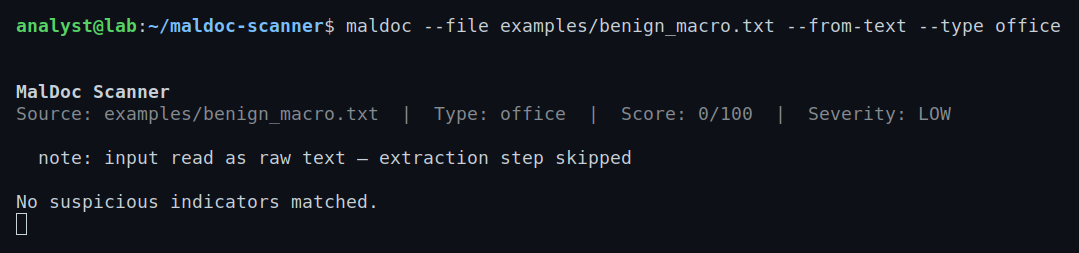
There's also a --from-text mode for when you already have macro source extracted elsewhere (useful when testing the scoring engine on synthetic samples or when oletools isn't available in the target environment).
2. Scoring
A single scoring engine runs against whichever extracted content was produced. Every pattern match contributes a weighted integer to a running total, capped at 100. Severity thresholds:
| Score | Severity |
|---|---|
| 0–24 | Low |
| 25–59 | Medium |
| 60–100 | High |
The score isn't meant to be a probability — it's a triage signal. A 100/100 means "multiple high-confidence indicators stacked on each other; treat this as malicious."
3. IOC Extraction
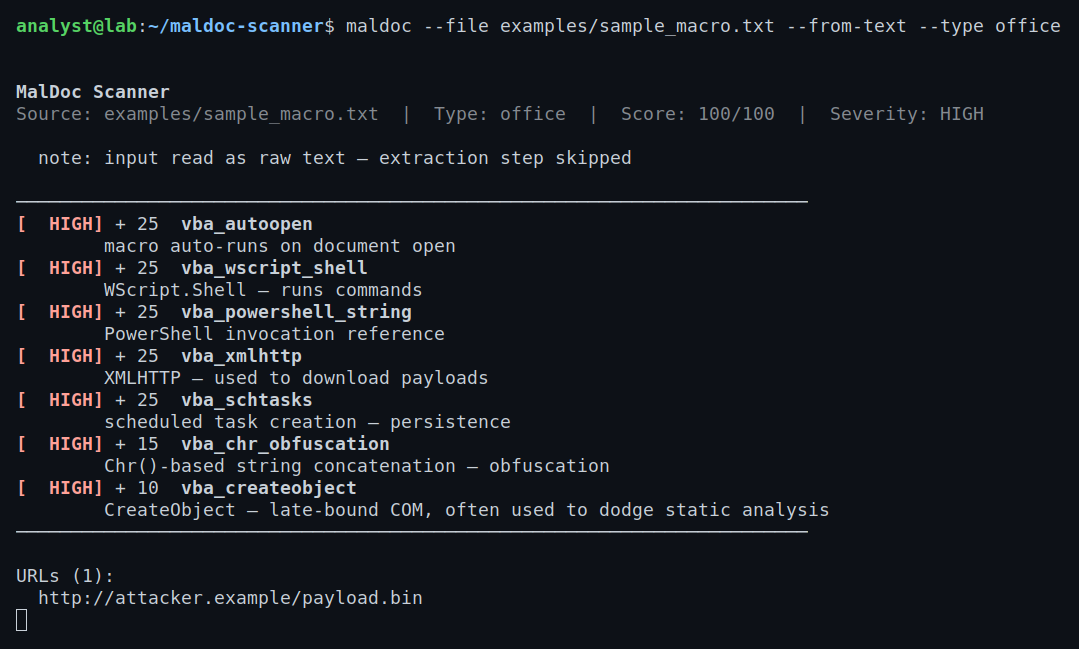
After scoring, a second pass over the extracted content pulls URLs and non-loopback IPv4 addresses using regex. If the macro has a download cradle pointing to http://attacker.example/payload.bin, that URL ends up in the report — no manual grep required.
Exit codes are machine-readable: 0 = low/medium, 1 = high severity, 2 = read error. This makes the tool composable in shell pipelines and CI contexts.
What It Detects
VBA / Office Indicators (24 patterns)
Auto-execute hooks — the first thing to check in any macro. AutoOpen, Document_Open, Workbook_Open, AutoExec, and AutoClose all fire without user interaction.
Shell and process execution — Shell(), WScript.Shell, PowerShell invocations, Invoke-Expression. Any of these in a macro that also has an auto-run hook is a significant flag.
Network and download primitives — XMLHTTP, WinHttp, URLDownloadToFile, and the PowerShell WebClient / DownloadString / DownloadFile pattern. These are the download cradles used to stage second-stage payloads.
Process injection — VirtualAlloc, RtlMoveMemory, CreateRemoteThread. These appear in shellcode-injection macros that allocate memory, copy shellcode, and spawn a remote thread — uncommon in legitimate docs.
Persistence — registry Run key writes and schtasks calls. Legitimate documents don't need scheduled tasks.
Obfuscation — Chr()-chain concatenation (classic VBA obfuscation), StrReverse, and hex literal sprinkles in strings. These don't indicate a specific behavior, but they lower the bar for what else I should trust in the file.
Anti-analysis — long Sleep() calls (sandbox evasion) and WMI queries that check for VirtualBox or VMware presence.
PDF Indicators (10 patterns)
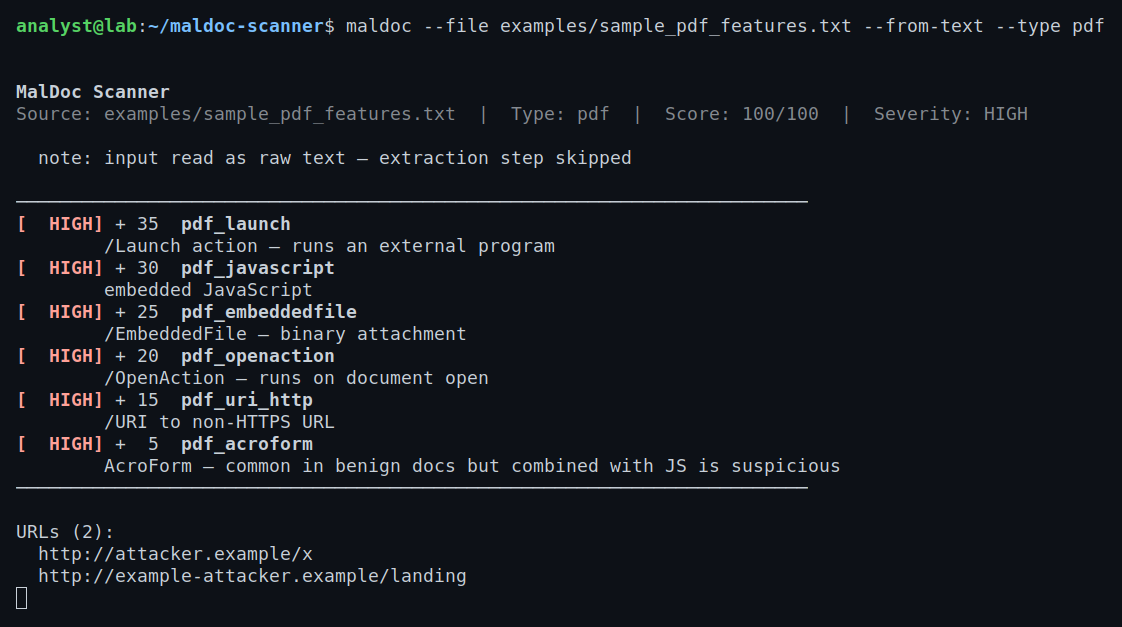
/JavaScript, /Launch, /OpenAction, /AA, /EmbeddedFile, /XFA, /URI (with separate weights for HTTP vs. data: scheme URIs), /AcroForm in combination with JavaScript, and /Encrypt. The /Launch action gets the highest weight because it directly executes an external program — there's almost no legitimate use for it in a document you received as an attachment.
Tech & Tools
- Python 3.10+
- oletools / olevba — VBA extraction from OLE compound document files
- pypdf — PDF object catalog walking
- re — the scoring engine itself is pure regex against the extracted text; no AST parsing, no execution
- dataclasses —
Hit,IOCs, andReportkeep the pipeline output typed and easy to serialize --jsonflag writes the fullReportto stdout for downstream tooling
The architecture is intentionally simple: ole.py and pdf.py handle extraction, indicators.py holds the pattern catalog, analyzer.py runs the scan and builds the Report, output.py handles rendering. Adding a new indicator is one line in indicators.py.
What I Learned
On static analysis design: The hardest part wasn't writing the regex — it was deciding on weights. I went back through documented macro malware samples to calibrate: CreateRemoteThread in a VBA macro is nearly always shellcode injection (weight 40), but CreateObject is so common in legitimate automation that it only adds 10 and needs other hits to matter. The catalog represents those judgment calls.
On the two-backend problem: Office and PDF extraction are structurally completely different. OLE is a container format with named streams; PDF is a graph of objects you have to walk. Keeping them behind a common text-output interface — both extractors just return a string — let the scoring engine stay format-agnostic. I didn't have to write two scorers.
On scope discipline: Early in the project I kept being tempted to add deobfuscation (decode Chr() chains into readable strings, follow StrReverse, etc.). I didn't, and I'm glad. Deobfuscation is a different domain, a different failure mode, and a different maintenance burden. The tool does one thing well.
On --from-text mode: I added it as a testing convenience and it turned out to be one of the more useful features. When you're analyzing malware in an isolated VM that doesn't have a full Python environment, you can dump the macro with whatever tool you have available, exfiltrate the text, and run the scorer separately. The extraction and scoring steps being independent is an architectural win.
On IOC extraction as a by-product: URLs and IPs in macro source code are almost always stage-two infrastructure. Pulling them automatically — rather than grepping manually — pairs directly with a threat intel enrichment step. The extracted IOCs are designed to feed into a ThreatPulse-style lookup pipeline.
What's Next
- RTF support (different parsing path than DOCX)
- OOXML relationship analysis — external image and template injection references
- Bulk directory mode with a per-file summary row
- Sigma rule output for matched indicators (so SigmaForge can convert them to detection rules)
- Hash-based VirusTotal lookup as an optional enrichment step