
PhishKit Analyzer — Static triage for phishing HTML artifacts
A static analysis tool that fingerprints phishing kits, identifies credential harvesting forms, detects brand impersonation, and extracts blocklist-ready IOCs from a saved HTML file
PhishKit Analyzer
Static triage for phishing HTML artifacts — finds kit fingerprints, credential harvesting forms, and embedded IOCs without ever loading the page in a browser.
The Goal
When a phishing report lands — a forwarded page, a suspicious URL from a user, a sample pulled from a threat feed — I want three things answered fast:
- Is this from a known kit, or hand-rolled?
- Where do the credentials actually go?
- What URLs, IPs, and domains do I need to block right now?
Most tools in this space want to execute the page, spin up a browser, or require a full sandbox. That's overkill for triage, and it creates its own risk. PhishKit Analyzer is designed to be the five-minute pass: give it a saved HTML file, get back a scored report and a list of IOCs.
How It Works
The analyzer parses the raw HTML through BeautifulSoup and runs a series of independent detection passes over the document tree and the raw text. Each pass produces zero or more RiskFactor records, each carrying a name, a severity weight, and a human-readable detail string. The final score is the sum of all matched weights, capped at 100.
The analysis pipeline:
- Kit fingerprint matching — regex patterns scanned against the raw HTML string
- Credential form detection — finds
<form>tags with password inputs, then checks whether the form action POSTs credentials cross-domain - Hidden iframe detection — inspects
<iframe>elements fordisplay:none,visibility:hidden, or pixel-sized dimensions - Brand impersonation check — compares the page
<title>against a list of major brands; flags when the title references a brand the page domain doesn't contain - IOC extraction — regex sweeps for all URLs, IPv4 addresses, and domains in the document
The tool defaults to operating on local files. Fetching a live URL requires an explicit --fetch flag per invocation — phishing pages can drop payloads even on programmatic fetches, so the safe default is to refuse.
What It Extracts
Kit fingerprints — patterns drawn from publicly documented kits:
| Fingerprint | What it catches |
|---|---|
16shop_marker |
Literal kit string from 16shop campaigns |
16shop_path |
Common 16shop admin PHP paths |
telegram_exfil |
Telegram bot API credential exfil endpoint |
discord_webhook |
Discord webhook credential exfil |
antibot_marker |
Anti-bot JS function bundled with many kits |
blocked_country_check |
Geo-block config strings used to evade researcher IPs |
obfuscated_eval |
eval(atob(...)) and similar decode-and-execute patterns |
redirect_to_legit |
Post-capture redirect to a real brand domain |
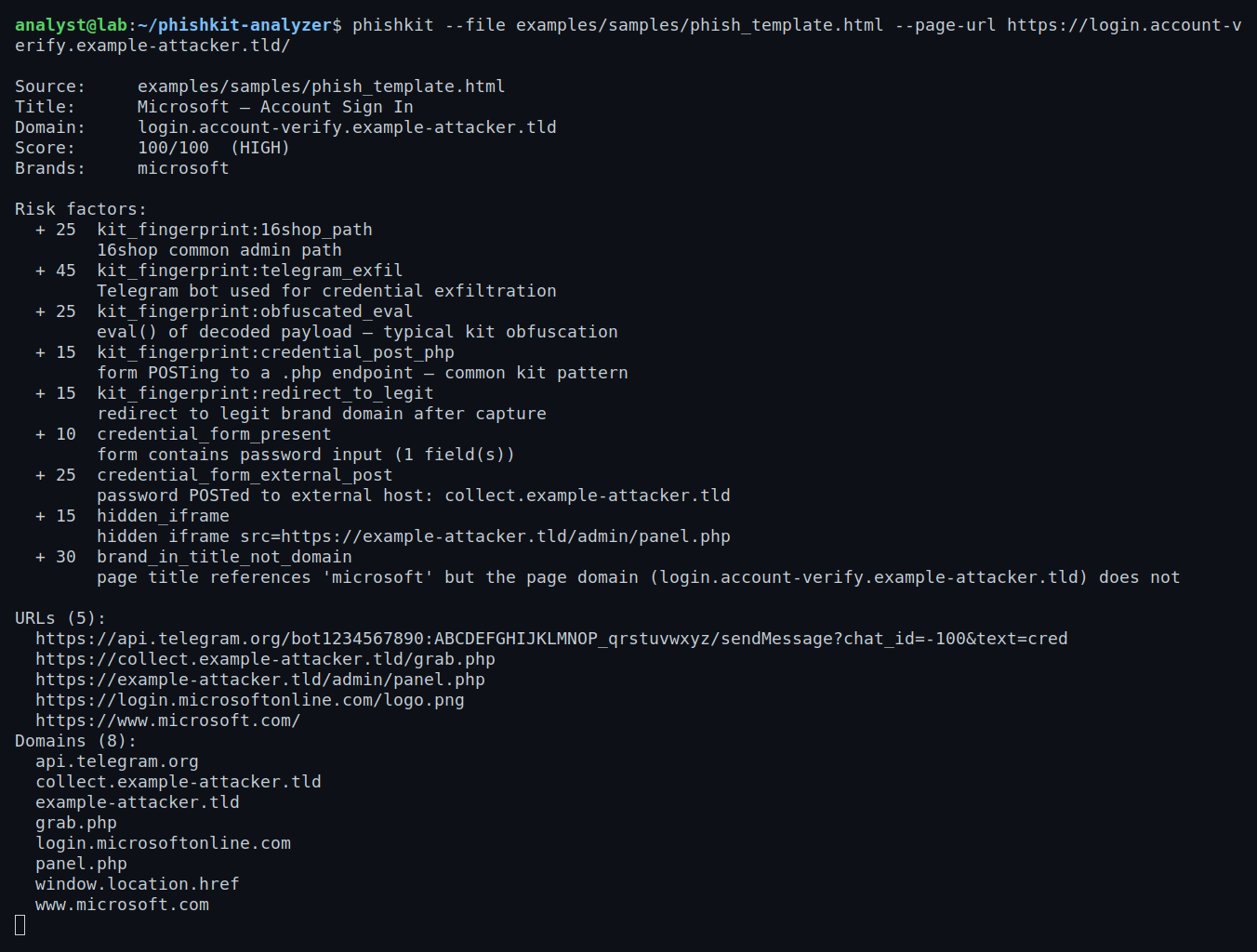
Credential form signals — whether a password form is present, and whether credentials are being POSTed to an external host rather than the page's own domain.
Hidden iframes — cloaking technique used to load tracker or exfil frames invisibly.
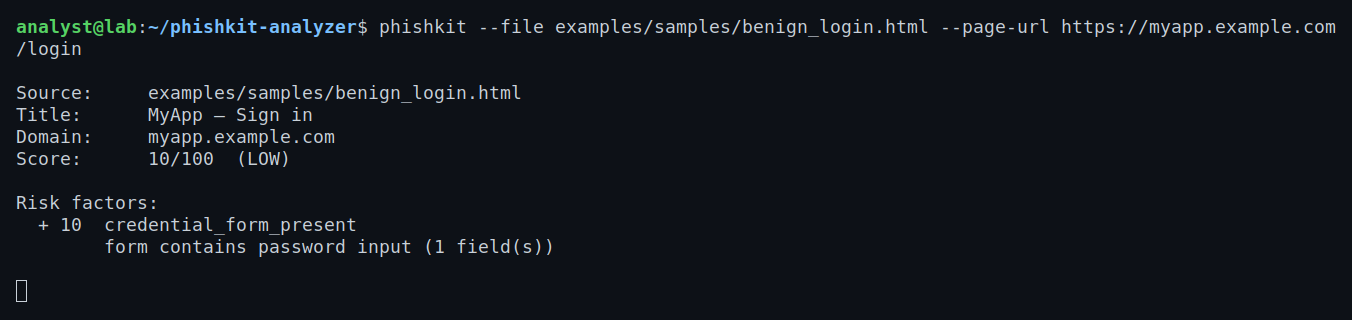
Brand impersonation — page title says "Microsoft — Account Sign In" but the domain is login-verify-microsoft-account.tld.
IOCs — all URLs, IPv4 addresses, and domains deduplicated and sorted, ready to paste into a SIEM or blocklist.
The output is available as a human-readable terminal report or structured JSON for piping into a SOAR pipeline.
Tech & Tools
- Python 3.10+
- BeautifulSoup 4 — HTML parsing and DOM traversal
re— raw-text regex passes for kit fingerprints and IOC extractionurllib.parse— domain extraction from form actions and page URLspython-whois(optional) — flags freshly registered domains on requestpyproject.tomlpackaging — installable asphishkitCLI entry point
The architecture is intentionally flat: analyzer.py holds the core logic as pure functions that take a string and return dataclasses. The CLI in cli.py handles I/O, flag parsing, and output formatting separately, which made unit testing straightforward — every detection function can be tested in isolation with a crafted HTML string.
What I Learned
On phishing kits specifically: Real kits are lazier than I expected. The 16shop and Telegram-exfil patterns are nearly verbatim strings left in the HTML — operators copy-paste kits without removing obvious markers. That makes static detection surprisingly reliable for known kits, even without executing any JavaScript.
On the cross-domain POST signal: A credential form that POSTs to a different host than the page it's on is almost never legitimate. Legitimate login forms post to the same domain or a known subdomain. When the action host diverges, it's either a kit's collection endpoint or a forwarding service. That single check adds more signal than I anticipated.
On safe analysis: The decision to make --fetch an explicit per-invocation opt-in rather than a flag you set once was deliberate. Phishing pages occasionally include drive-by payloads that fire on any HTTP client, not just browsers. Making the safe behavior the default removes a footgun that would otherwise be easy to forget.
On parsing HTML you don't control: Phishing HTML is often malformed — broken tags, mismatched quotes, partial DOM trees from kit assembly errors. BeautifulSoup's error tolerance was essential; a strict parser would have missed real signals because the surrounding markup was broken.
On IOC extraction: A naive URL regex matches too aggressively — it pulls in image paths, CSS references, and CDN URLs that aren't useful IOCs. Filtering out well-known asset extensions and the page's own domain as a post-processing step dramatically reduced noise in the output.