
Pi-hole Lab — DNS Filtering on the LAN
A Raspberry Pi 5 running Pi-hole with a local unbound recursive resolver — DNS-layer ad/tracker/malware blocking, observability via Prometheus + Grafana, and a doc set built like infrastructure.
Putting a sinkhole between my LAN and the internet
"Breaking things to make them stronger" — and sometimes the thing you break is the third-party tracker economy on your own network.
TL;DR
I deployed Pi-hole on a Raspberry Pi 5 to act as my home network's DNS server, paired with a local unbound recursive resolver so I'm not handing every query log to a third party. Within minutes of going live, ~30% of DNS queries from my LAN were getting blocked — most of them ad-tracking and telemetry calls I never thought twice about. This post is a mix of the build (with the gotchas), the architecture, and what the dashboard told me about my own network that I didn't expect.
Why bother
Two reasons.
The boring one: I run a homelab. I want to point a DNS server at the LAN that I control, that logs queries I can analyze, and that blocks the obvious tracker / malware-C2 garbage at the network layer instead of relying on per-device extensions.
The interesting one: DNS is one of the most under-appreciated observation points on a network. Almost every modern attack — phishing, malware C2, data exfiltration, supply-chain compromise — touches DNS at some point. A blue-teamer who can't read DNS logs is missing a huge chunk of the picture. So this project doubles as a "live lab" — a place I can run real queries, watch real traffic, and build intuition for what malicious DNS patterns look like.
What's actually new about this build
The Pi-hole-on-a-Raspberry-Pi tutorial has been written a thousand times. What I tried to do differently:
-
Recursive resolution local, not third-party. The default Pi-hole config forwards to Cloudflare/Google. Mine forwards to a local
unboundinstance that walks the DNS tree itself starting from the root servers. No upstream provider has a complete log of my queries. Cloudflare is configured only as an emergency fallback. -
Documented as infrastructure. The repo has a deployment guide, an architecture doc, a hardening doc, and an analysis doc — not a single README full of "just run this." If the Pi catches fire tomorrow, I can rebuild it from these docs.
-
Honest about the limits. DNS filtering is one layer. It doesn't beat DoH. It doesn't beat first-party tracking. It doesn't beat hardcoded IPs. The doc set says so explicitly. Pretending otherwise is how blue-team work gets discredited.
The architecture in 30 seconds
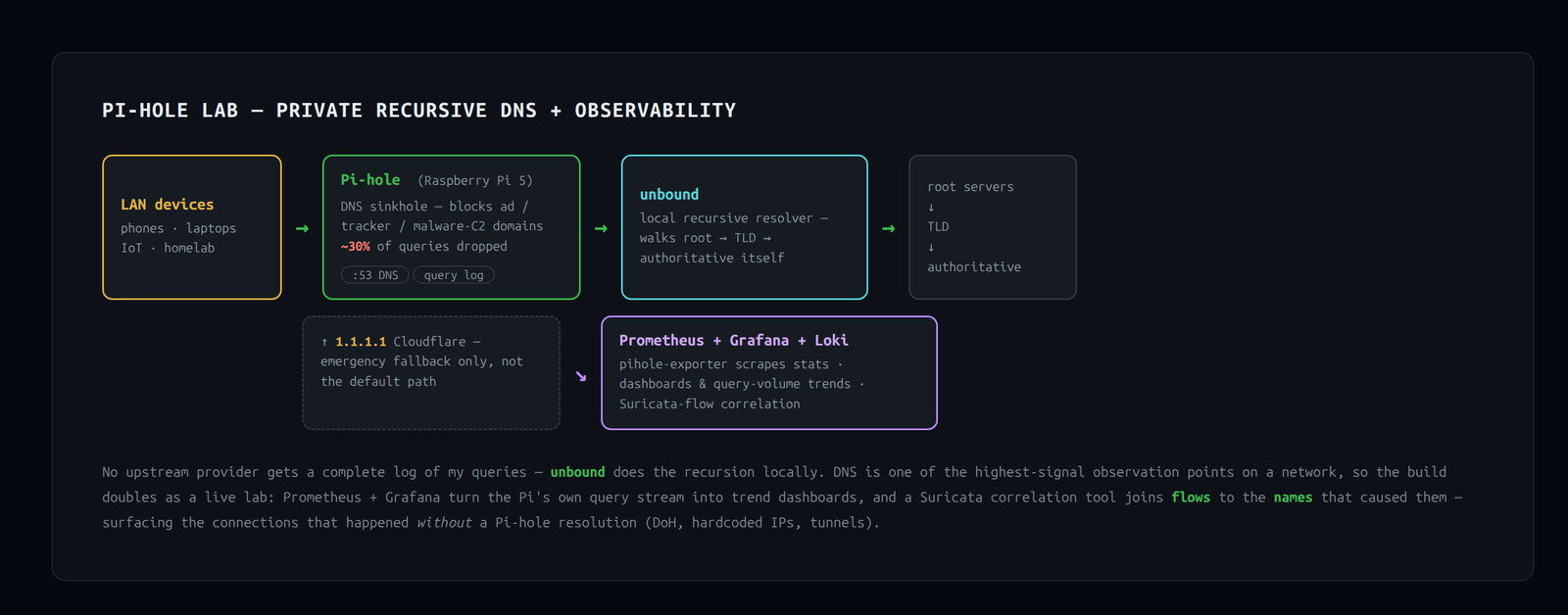
[LAN devices]  --DNS-->  [Pi-hole]  ---->  [unbound]  ---->  [root → TLD → authoritative]
                            |
                            +-- 1.1.1.1 (Cloudflare, fallback only)
Pi-hole gets the query, checks gravity (its blocklist of ~150k domains), and either:
- returns
0.0.0.0if the domain is blocked, or - forwards to
unboundfor real recursion.
Full architecture doc: docs/01-architecture.md.
Things that bit me
For posterity, the things that didn't go to plan:
NordVPN had the LAN locked down too hard
Couldn't even nmap the LAN to find the Pi at first. NordVPN ships with LAN Discovery: disabled and ARP Ignore: enabled by default, which makes the local subnet effectively invisible to the host. Easy fix, but worth flagging: VPN clients aggressively isolate your LAN by default. If you're doing any homelab work behind one, you'll trip over this.
Even after fixing discovery, NordVPN's nftables rules continued to drop my workstation's outbound port 53 traffic to the Pi. (Other LAN devices were unaffected.) I was able to test through SSH into the Pi instead. This is a workstation-specific quirk, not a Pi-hole problem.
The first SD card was dying
About 20 minutes into the apt-upgrade phase, the kernel started reporting EFSBADCRC errors on the rootfs. The card was a microSD in a USB reader, not a quality SSD. Stopping the build, reflashing to a fresh card, and resuming was the right call. For a Pi that's going to be infrastructure, don't cheap out on the storage.
Pi-hole v6 install needed a manual FTL restart
After the unattended installer finished, blocking percentage was stuck at 0%. The gravity database was populated correctly (84,752 domains) but pihole-FTL hadn't loaded them at runtime — pihole reloadlists was failing with FTL_PID_FILE: readonly variable (a script bug in utils.sh). A hard systemctl restart pihole-FTL cleared it up. This is documented but easy to miss.
What the dashboard tells you
This is the part of running Pi-hole nobody talks about enough.
After ~24 hours of traffic:
- ~30% block rate on default lists. Not 30% of bandwidth — 30% of queries.
- One device dominated the query count. A smart home gadget I'd forgotten was even on the LAN was making >10× more queries than my laptop.
- My own browser made queries to domains I didn't know it talked to. Telemetry, font CDNs, prefetch endpoints, fingerprinting libraries. The amount of "I just opened a new tab" → "device made 14 outbound DNS queries" is genuinely uncomfortable.
- A few sites broke. Specifically, an article paywall and a hotel captive portal. Both were diagnosable via the query log in 30 seconds and fixable with a one-click whitelist.
For a fuller breakdown including the queries you should actually look for if you're using this as a security tool, see docs/03-analysis.md.
Hardening the resolver
The Pi sees every DNS query from every device on the LAN. That's a privileged position — losing it to an attacker means losing visibility into all browsing and gaining the ability to MITM anything. So the Pi is treated as infrastructure now:
- SSH key-only auth, fail2ban, restricted to LAN
- UFW firewall: only DNS / SSH / admin-UI ports, only from 10.0.0.0/24
- Unattended security upgrades on
- Strong web admin password, no public exposure
- Self-test cron from another machine that alerts if DNS resolution breaks
- Periodic config backups via
pihole -a -t(teleporter)
Full hardening checklist: docs/04-hardening.md.
What I built next
The "what's next" list of the original post turned into a real
toolkit. Each of these lives under tools/ or monitoring/ and
has its own README — quick tour:
DoH / DoT egress detector
Pi-hole only sees DNS that comes to it. A device with hardcoded DoH (Firefox, smart TVs, phones) walks straight through. So:
- A blocklist of known DoH/DoT bootstrap hostnames gets added to gravity, forcing clients back onto Pi-hole.
- A Python script scans the FTL DB for queries to those hosts and prints the LAN IPs that tried to bypass.
The attempt is the signal, not the block. → tools/doh_dot_detector/
Canary domains
Internal-only honey-names like vault-prod.canary.lan and
backup-nas.canary.lan resolve only on my LAN. Nothing on a clean
network should ever query them. The watcher script tails the FTL
DB and pages on the first hit. Lowest-effort detection I've built
that catches real attacker behaviour (internal recon).
→ tools/canary/
DGA detector
A dependency-free Python tool that scores every domain Pi-hole sees on three features — Shannon entropy, English-bigram log-likelihood, and length/digit ratio — and returns the top-N most suspicious. Doesn't classify; triages 50,000 domains down to the 25 worth eyeballing.
$ python3 dga_detector.py --score kq8fzjwlmbpxqr3
       score: 0.842   (← high — random-looking)

$ python3 dga_detector.py --score github
       score: 0.077   (← clean)
→ tools/dga_detector/
Per-device profile
A markdown report of every client on the LAN: queries/hour, block
ratio, top destinations, and a hand-tuned "loudness" verdict. The
analysis doc now has a table you can actually read.
→ tools/device_profile/
Suricata × Pi-hole correlation
Suricata sees flows; Pi-hole sees the names that became those
flows. Joining them lets you ask "what domain was this connection
for?" — and, more interesting, "which flows happened without a
Pi-hole resolution?" That last set is where DoH endpoints,
hardcoded IPs, and tunnels live.
→ tools/suricata_correlation/
Prometheus + Grafana + Loki
The default Pi-hole UI is fine for a glance; it falls over for
multi-week analysis. So a docker-compose stack ships
pihole-exporter → Prometheus → Grafana with a pre-built dashboard,
plus Loki + promtail tailing pihole.log/FTL.log/eve.json for
log search. Lives off-Pi so a Pi reboot doesn't take observability
down with it.
→ monitoring/
What's next (the new list)
- Wazuh agent on the Pi for HIDS coverage on top of NIDS.
- A "DNS threat hunting playbook" companion doc — what to look for in real query logs (NXDOMAIN spikes, beaconing intervals, tunnel signatures).
- Disaster-recovery test — wipe the SD, rebuild from
docs/alone, see what's missing. The docs claim to be reproducible; let's prove it.
What I'd do differently
- Use a proper SSD from day one. The microSD-in-a-USB-reader was a false economy. The build's biggest delay was reflashing onto fresh media after the first card died.
- Set up monitoring before the dashboard is interesting. I built monitoring after the fact. Should've been step 5, not step 12 — exactly the kind of thing you only remember to do once it's already broken.
- Skip the unattended installer's auto-FTL-start. I'd run the installer with
--no-restartnext time and start FTL manually after confirmingpihole.tomllooks sane.
Resources
- Pi-hole docs — actually quite good
- unbound on Debian — the validator-config-conflict gotcha is documented here
- firebog.net blocklists — curated blocklists for when you outgrow the defaults
- The repo for this project: github.com/B0bTheSkull/pihole-lab